All platforms
Chromebook

Free Takeoff Software for Chromebook

A $200 Chromebook and a free takeoff tool. That is the entire setup. No $1,749 PlanSwift license. No $1,200 Windows laptop. Just open Chrome and start measuring.

Traditional Takeoff Software Requires an Expensive Setup

Most contractors who search for takeoff software for Chromebook assume it does not exist. The traditional takeoff setup looks like this: a Windows laptop starting at $1,200 for something reliable, plus a PlanSwift license at $1,749 per year. That is over $3,000 before you measure a single wall. For many one-person shops, small remodeling companies, and subcontractors starting out, that number is hard to justify when you are bidding on $20,000 to $50,000 jobs with thin margins.

PlanSwift, On-Screen Takeoff, and Bluebeam Revu all require Windows. They cannot run on Chrome OS at all. A Bluebeam community post states plainly: "Bluebeam is not supported by Chrome/Chromebooks." Cloud-based alternatives like STACK do work on Chromebook, but they cost $2,599 to $3,999 per year per user, which defeats the purpose of choosing budget-friendly hardware.

As of 2026, zero takeoff software companies have a Chromebook-specific page on their website. The entire search category is uncontested. But the demand is real. Chromebooks are the most affordable computers that can run a modern web browser, and Easy Takeoffs is a full-featured takeoff tool that runs in Chrome. A $200 Chromebook and a free account is the lowest-cost path to professional takeoff software that exists.

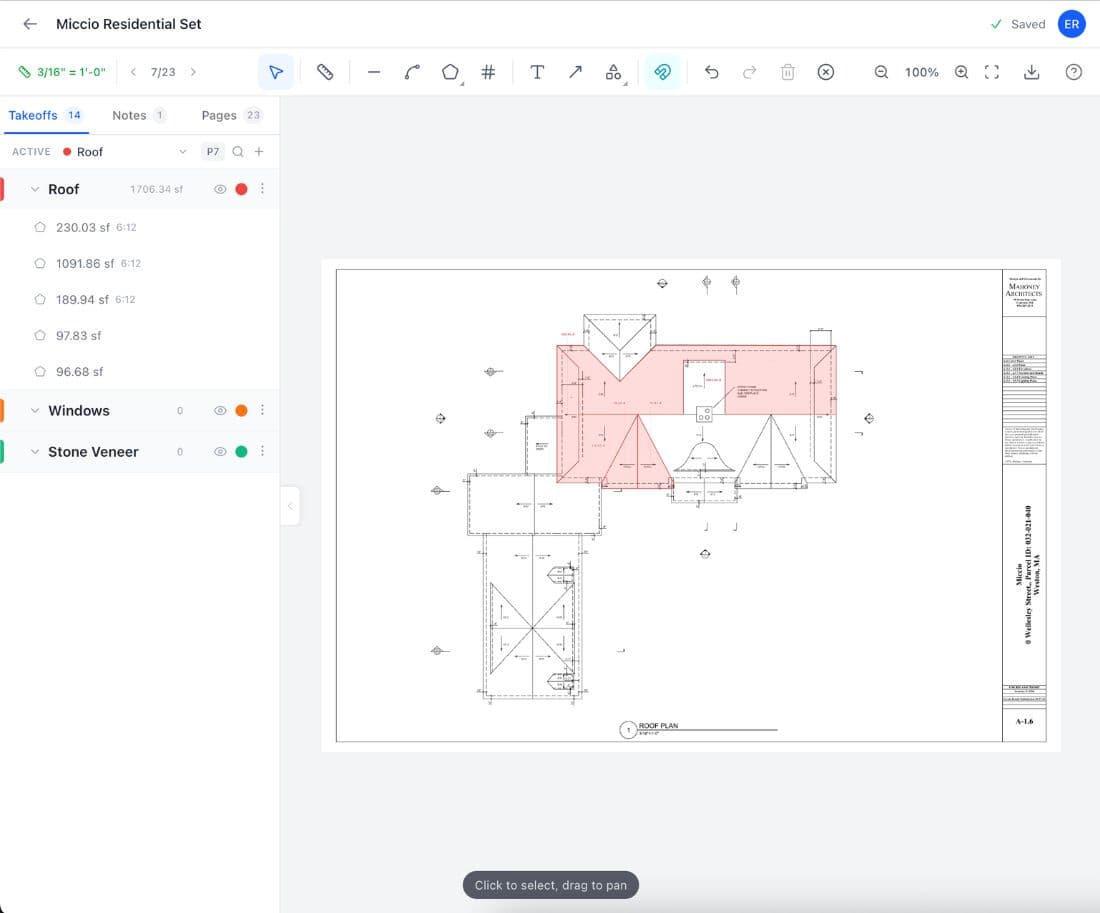
Easy Takeoffs running on Chromebook
How It Works

How Easy Takeoffs Works on Chromebook

1

Open Chrome

That's it. No install, no download, no compatibility check. Go to easytakeoffs.com.

2

Upload your plans

Drag PDFs from Files or Google Drive. Auto scale reads the drawing’s scale bar.

3

Measure everything

Linear, polyline, area, rectangle, and count tools. Same tools as on any desktop. Full keyboard shortcuts.

4

Export to Google Sheets

Download CSV and open directly in Google Sheets for material ordering and cost tracking. Or export annotated PDFs.

Advantages

Chromebook Advantages for Takeoffs

Works in Chrome, no workarounds

Easy Takeoffs is a web app. Chrome is a web browser. There is nothing to configure, install, or troubleshoot. Open Chrome and you are ready to measure.

Budget-friendly hardware

A capable Chromebook costs $200 to $300. Pair it with free Easy Takeoffs and your total takeoff setup costs less than one month of a PlanSwift subscription.

Built-in security

Chrome OS auto-updates, blocks executables, and verifies itself on every boot. No anti-virus needed. No ransomware risk from opening a client’s plans.

Google Workspace integration

Export your takeoff CSV, open it in Google Sheets, share it with your team via Google Drive. Everything syncs without third-party file transfer tools.

10-year update support

Chromebooks receive automatic security and feature updates for 10 years from their release date. No planned obsolescence, no forced hardware upgrades.

Boot in seconds

Open the lid and you are working. No Windows login screen, no update restarts, no startup programs competing for resources. Chromebooks go from off to ready in about 8 seconds.

Which Takeoff Tools Work on Chromebook?

Most takeoff software requires Windows. Here is what actually works on a Chromebook and what it costs.

ToolWorks on Chromebook?PriceNotes
Easy Takeoffs$0/yearFull functionality
Bluebeam$260–$440/yr"Not supported by Chrome/Chromebooks"
PlanSwift$1,749/yrWindows desktop only
On-Screen Takeoff$3,495 one-timeWindows desktop only
STACK$2,599–$3,999/yrCloud-based, works in Chrome
Procore$20,000+/yrCloud-based, overkill for takeoffs
Cost Comparison

The Real Cost of Takeoff Software

Traditional takeoff setups cost thousands in hardware and software. Here is a side-by-side comparison of what contractors actually pay.

Traditional (Windows + PlanSwift)

Windows laptop$1,200
PlanSwift license$1,749/yr
Anti-virus software$80/yr
Year 1 total$3,029
Annual ongoing$1,829/yr

Cloud (Windows + STACK)

Windows laptop$1,200
STACK Takeoff & Estimate$2,999/yr
Year 1 total$4,199
Annual ongoing$2,999/yr

Chromebook + Easy Takeoffs

Chromebook$250
Easy Takeoffs$0
Anti-virus software$0
Year 1 total$250
Annual ongoing$0/yr

Best Chromebooks for Construction Takeoffs

Any modern Chromebook will run Easy Takeoffs smoothly. Here are some options at different price points.

ModelScreenPriceBest For
HP Chromebook 1414" HD~$199Most affordable. Large screen for the price.
Acer Chromebook Plus 51414" FHD~$300Best value. 512GB SSD, bright screen.
Lenovo Chromebook Duet11" 2-in-1~$250Tablet and laptop flexibility for job sites.
Samsung Galaxy Chromebook Plus15.6" FHD~$450Largest screen for plan detail and long sessions.
Common Questions

Chromebook Takeoff Software FAQ

Yes, you can run full takeoff software on a Chromebook using Easy Takeoffs. It is a web application that runs in Chrome, which means no installation, no compatibility workaround, and no performance limitations beyond what Chrome itself can handle. You get the same measurement tools available on Windows or Mac: linear, area, polyline, rectangle, count, and angle measurements, plus automatic scale detection, measurement grouping with color coding, and export to annotated PDFs or CSV spreadsheets. The key distinction is that traditional takeoff software like PlanSwift, On-Screen Takeoff, and Bluebeam Revu are Windows desktop applications that cannot run on Chrome OS. They require a Windows installation, and Chromebooks do not support Windows. There is no emulation layer, no compatibility mode, and no workaround that can make these tools run on a Chromebook. Cloud-based takeoff tools that run in a browser, like Easy Takeoffs and STACK, work on any Chromebook because they only need a web browser. The difference is cost: STACK starts at $2,599 per year, while Easy Takeoffs is completely free with no trial limits or feature gating.

Any web-based construction software works on Chromebook. For takeoffs, Easy Takeoffs runs in Chrome with full measurement, scale calibration, and export features at no cost. For project management, tools like Procore, Buildertrend, and CoConstruct all have web interfaces that work in Chrome. For accounting and invoicing, QuickBooks Online and FreshBooks run in any browser. Google Workspace (Docs, Sheets, Drive) is native to Chrome OS and handles estimating spreadsheets, proposals, and file sharing seamlessly. For communication, Slack, Microsoft Teams, and Zoom all have web apps that work on Chromebook. The tools that do not work on Chromebook are Windows desktop applications: PlanSwift, On-Screen Takeoff, Bluebeam Revu, and most CAD software like AutoCAD (the desktop version). The web version of AutoCAD does work on Chromebook, though with limited functionality compared to the desktop. The trend in construction software is moving toward browser-based tools, which means Chromebook compatibility is improving every year. For a small contractor who primarily needs takeoff, estimating, invoicing, and communication tools, a Chromebook can handle the entire workflow.

Yes. Construction takeoff software like Easy Takeoffs is a web application that runs in Chrome, and modern Chromebooks handle web applications comfortably. The processing-intensive work, like rendering PDF pages and calculating measurement areas, happens in the browser using technologies that Chromebooks are specifically optimized for. A Chromebook with 4GB of RAM and an Intel Celeron or MediaTek processor will run Easy Takeoffs smoothly for typical residential plans. For large commercial plan sets with 20 or more pages, a Chromebook with 8GB of RAM and a newer processor (Intel Core i3 or equivalent) will give you better performance when switching between pages. The limiting factor is rarely the Chromebook itself. It is more likely to be screen size: a 14-inch or larger screen makes it easier to read dimension text and work with detail drawings. If you are comparing a $200 Chromebook to a $1,200 Windows laptop, the Windows machine will obviously be faster, but for the specific task of running a browser-based takeoff tool, the Chromebook is more than adequate.

No. Bluebeam does not work on Chromebook in any supported way. Bluebeam Revu is a Windows desktop application that requires Windows 10 or later, and Chrome OS cannot run Windows software. A Bluebeam community forum post states explicitly: "Bluebeam is not supported by Chrome/Chromebooks." Bluebeam Cloud, the web-based version, might seem like it should work in Chrome, but Bluebeam does not officially support or test it on Chrome OS. Users have reported layout issues, missing features, and general instability when trying to access Bluebeam Cloud from a Chromebook. Even if it did work perfectly, Bluebeam Cloud costs $260 to $440 per year and is missing many of the features that made the desktop version popular among contractors, including advanced measurement tools, the typewriter tool, and batch processing. For Chromebook users who need takeoff software, Easy Takeoffs is a free alternative that is designed and tested to run in Chrome on Chrome OS. It includes the measurement tools most relevant to construction takeoffs: linear, area, polyline, rectangle, count, and angle, plus automatic scale detection, measurement grouping, and export to annotated PDFs or CSV spreadsheets.

No. PlanSwift is a Windows-only desktop application and cannot run on Chrome OS. There is no web version of PlanSwift, no Chrome extension, and no workaround that allows it to run on a Chromebook. PlanSwift requires Windows 10 or later and installs locally on the computer’s hard drive. Chrome OS does not support Windows executables, so the software simply cannot be installed. Some users have asked about running PlanSwift through Android emulation on Chromebook, but PlanSwift does not have an Android app and has never released one. PlanSwift also costs $1,749 per year, which is a significant expense on top of whatever hardware you use. For context, you could buy a new Chromebook every year for less than the cost of one PlanSwift subscription. Easy Takeoffs is a free, browser-based alternative that provides the core takeoff tools contractors need: linear, area, polyline, rectangle, count, and angle measurements, automatic scale detection, measurement grouping with color coding, PDF annotation export, and CSV export for spreadsheets. It runs natively in Chrome on any Chromebook with nothing to install.

For construction takeoffs, Easy Takeoffs is the best free option on Chromebook. It runs in Chrome with no installation required and includes linear, area, polyline, rectangle, count, and angle measurement tools, automatic scale detection, measurement grouping with color coding, multi-page PDF support, and export to annotated PDFs or CSV spreadsheets. There is no trial period and no feature limitations. You can measure residential remodels and multi-story commercial plans alike without hitting any paywall. For other construction tasks on Chromebook, Google Sheets handles estimating and cost tracking with templates available for free. Google Drive provides file storage and sharing with 15GB included. Invoice Ninja offers free invoicing. Fieldwire has a free tier for punch lists and task management. The advantage of Chromebook for construction work is that the operating system itself is free, updates are automatic for 10 years, and there is no anti-virus software needed. Combined with free tools like Easy Takeoffs and Google Workspace, a Chromebook gives small contractors a complete digital toolkit at the cost of the hardware alone, often under $300 total.

Yes, Chromebooks handle large construction PDFs well when using a browser-based tool like Easy Takeoffs. The application loads PDF pages one at a time rather than loading the entire document into memory, which means a 50-page plan set does not require 50 pages worth of RAM. Each page is rendered individually when you navigate to it. For typical residential plans (5 to 15 pages), any modern Chromebook will work without issue. For larger commercial plan sets (20 or more pages with detailed drawings), a Chromebook with 8GB of RAM will give you smoother performance when switching between pages. File upload speed depends on your internet connection rather than the Chromebook’s processing power, since the PDF is uploaded to Easy Takeoffs’ cloud storage. A 100MB plan set over a standard broadband connection uploads in under a minute. One practical tip: avoid opening multiple large PDFs simultaneously in different browser tabs, as each tab consumes memory independently.

It depends on what software you need. A Chromebook is better if your work relies on browser-based tools: Easy Takeoffs for takeoffs, Google Workspace for documents and spreadsheets, QuickBooks Online for accounting, and email for communication. In that case, a $200 to $300 Chromebook does everything you need with longer battery life, faster boot times, better security, and a fraction of the cost of a Windows laptop. A Windows laptop is necessary if you use desktop software that requires Windows: AutoCAD, Revit, PlanSwift, On-Screen Takeoff, or specialized estimating software like Sage or Viewpoint. These applications cannot run on Chrome OS. Many contractors find that a Chromebook works perfectly for 90% of their daily tasks and only need a Windows machine for specific applications. If that describes your situation, using a Chromebook as your primary device and keeping a Windows desktop at the office for the occasional desktop-only task is a cost-effective setup.

Easy Takeoffs requires an internet connection to load your projects and save your work, so fully offline use is not currently supported. However, once a project is loaded in your browser, the measurement tools continue to work even if your connection drops temporarily. Your changes are saved locally and sync when the connection returns. For job site use, most contractors have sufficient cellular data coverage for a browser-based tool to work. If you are in an area with no cell coverage at all, the practical approach is to do your takeoff work where you have connectivity (office, home, or a coffee shop near the site) and use the job site visit for visual verification rather than active measuring. Chromebooks with LTE or 5G built in can use a data plan for connectivity anywhere with cell coverage, eliminating dependence on Wi-Fi. A 4G-enabled Chromebook adds about $50 to $100 to the purchase price and is worth considering if you frequently work at remote job sites.

The best Chromebook for a contractor depends on budget and where you use it. For office-only use on a budget, the HP Chromebook 14 at roughly $199 gives you a large screen and reliable performance for browser-based work. For the best overall value, the Acer Chromebook Plus 514 at around $300 offers a sharp 14-inch Full HD display, 512GB of storage, and a processor that handles multiple tabs and large PDFs smoothly. If you want something you can carry to job sites as a tablet, the Lenovo Chromebook Duet at about $250 is an 11-inch 2-in-1 that detaches from its keyboard and works as a touchscreen tablet. For maximum screen real estate, the Samsung Galaxy Chromebook Plus at around $450 has a 15.6-inch Full HD display that makes reading plan details and dimension text comfortable for extended sessions. Whichever model you choose, prioritize at least 8GB of RAM and a Full HD (1920x1080) display. The extra RAM helps when working with large plan sets, and the higher resolution makes fine blueprint text significantly easier to read.

Easy Takeoffs on Other Devices

Start Your Free Construction Takeoff Today

Upload your first PDF plan set, set the scale, and pull accurate quantities before lunch. No credit card. No commitment. No per seat fees.