All platforms
Mac

Free Takeoff Software for Mac

Bluebeam dropped Mac support in 2023. PlanSwift has never worked on Apple Silicon. Easy Takeoffs runs natively in Safari or Chrome on any Mac with nothing to install and nothing to pay.

Mac Users Have Been Left Behind

If you search for takeoff software for Mac, you will find a frustrating landscape. Bluebeam killed Mac support in June 2023 when it discontinued Revu for Mac 2.1. The replacement, Bluebeam Cloud, is missing the measurement tools, typewriter tool, and batch processing that made the desktop version useful. Contractors who relied on Revu describe the cloud version as "glitchy, slow, cumbersome, and missing 90% of what made Revu so good." If you are on a Mac, the product that thousands of estimators depended on no longer exists in any meaningful form.

PlanSwift cannot install on M1, M2, M3, or M4 Macs. Boot Camp, the old workaround for running Windows on Intel Macs, is unavailable on Apple Silicon. On-Screen Takeoff states plainly: "None of our desktop products can be installed directly within MAC OSX." The three biggest traditional takeoff tools are all incompatible with native macOS.

The remaining workaround is Parallels, a $100 to $120 per year virtual machine that runs Windows inside macOS. It works, but with performance overhead, driver issues, and the added cost of a Windows license on top of whatever takeoff software you install inside it. As one principal architect put it, "Bluebeam Revu is the only reason I have Parallels." That is $120 a year just to access a tool that should run natively. Easy Takeoffs does.

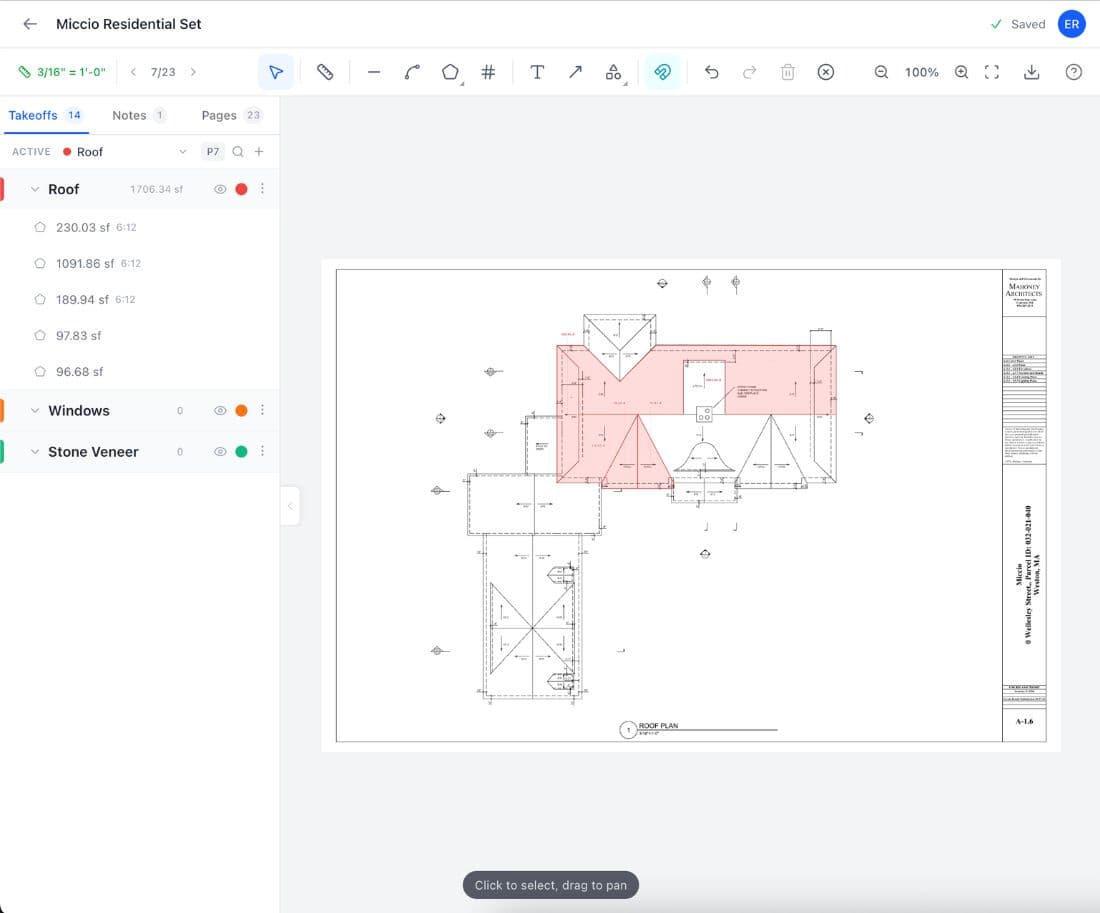
Easy Takeoffs running on Mac
How It Works

How Easy Takeoffs Works on Mac

1

Open Safari or Chrome

No download, no install, no Parallels. Go to easytakeoffs.com and sign in.

2

Upload your PDF plans

Drag and drop from Finder. Auto scale detection reads the drawing’s scale bar.

3

Measure with any tool

Linear, polyline, area, rectangle, and count tools. Full keyboard shortcuts. Retina-sharp detail at every zoom level.

4

Export and order materials

Download annotated PDFs or CSV spreadsheets. AirDrop to your team or share a read-only link.

Advantages

Mac Advantages for Takeoffs

Native Safari performance

Safari on Apple Silicon is roughly 19% faster than Chrome in browser benchmarks and uses about 17% less RAM. Your takeoffs stay responsive even on 50-page plan sets without switching to a heavier browser.

Retina display clarity

Mac Retina displays run at 218 or more pixels per inch, roughly double a typical Windows laptop. Fine blueprint details, dimension text, and small symbols are sharp without zooming in.

Apple Silicon efficiency

M-series chips deliver desktop performance at laptop power consumption. Run takeoffs all day on battery without the fan spinning up. No thermal throttling during long estimating sessions.

macOS Split View

Tile Easy Takeoffs next to your spec book, material calculator, or email. Native macOS window management with no third-party tools needed. Drag a window to the edge to snap it into place.

Drag and drop from Finder

Drag PDFs directly from Finder into Easy Takeoffs. No file picker dialog, no navigating folder trees. Grab your plan set and drop it in.

AirDrop sharing

Export a takeoff PDF and AirDrop it to your foreman’s iPad in seconds. No email, no cloud link, no waiting for an upload. The file lands directly on their device.

Which Takeoff Tools Work on Mac?

Most takeoff software was built for Windows and never made it to Mac. Here is an honest look at what works, what does not, and what it costs.

ToolWorks on Mac?PriceNotes
Easy Takeoffs$0/yearFull functionality on any Mac
Bluebeam Revu$260–$440/yrMac version discontinued June 2023
Bluebeam CloudPartial$260–$440/yrMissing measurement tools, typewriter, batch processing
PlanSwift$1,749/yrWindows only. Incompatible with M1/M2/M3/M4
On-Screen Takeoff$3,495 one-timeWindows only. No Mac support of any kind
STACK$2,599–$3,999/yrCloud-based, works on Mac
Procore$20,000+/yrCloud-based, but overkill for takeoffs
Cost Comparison

The Real Cost of Running Takeoff Software on a Mac

Most Mac users end up paying for a virtual machine just to access their takeoff tool. Here is what that actually costs compared to Easy Takeoffs.

Parallels + Bluebeam on Mac

Parallels Desktop Pro$120/yr
Bluebeam Complete$440/yr
Year 1 total$560
Annual ongoing$560/yr

Easy Takeoffs on Mac

Easy Takeoffs$0
Year 1 total$0
Annual ongoing$0/yr
Common Questions

Mac Takeoff Software FAQ

Bluebeam Revu does not work on Mac. Bluebeam discontinued the Mac version of Revu (version 2.1) in June 2023, and it is no longer available for download or purchase. The only Bluebeam option for Mac users is Bluebeam Cloud, a web-based product that runs in a browser. However, Bluebeam Cloud is missing many of the features that made Revu the industry standard, including advanced measurement tools, the typewriter tool, batch processing, and custom tool chests. Contractors who have tried it describe it as a stripped-down version with limited functionality. The cloud version also requires an active internet connection and does not support the same keyboard shortcuts and workflow patterns that experienced Revu users relied on for speed. If you relied on Revu for Mac for your construction takeoffs, Easy Takeoffs is a free alternative that runs natively in Safari or Chrome on any Mac, including all Apple Silicon models. It includes linear, area, polyline, rectangle, count, and angle measurement tools, automatic scale detection, measurement grouping with color coding, and export to annotated PDFs or CSV spreadsheets. There is no virtual machine required and no subscription fee.

No, PlanSwift cannot run on any MacBook with Apple Silicon. PlanSwift is a Windows desktop application that requires a Windows operating system to install and run. On older Intel-based Macs, some users ran PlanSwift through Boot Camp, which allowed a Mac to boot directly into Windows. Apple Silicon Macs (M1, M2, M3, M4) do not support Boot Camp, so that workaround is no longer available. The only remaining option is running PlanSwift inside a virtual machine like Parallels Desktop, which costs $100 to $120 per year and comes with performance overhead. Even with Parallels, some users report that PlanSwift runs sluggishly because the virtual machine shares your Mac’s CPU and RAM with macOS. PlanSwift’s own documentation does not guarantee compatibility with virtualized environments. PlanSwift itself costs $1,749 per year, so the total setup runs over $1,800 annually before you even factor in the time spent configuring and troubleshooting the virtual machine. Easy Takeoffs is a browser-based takeoff tool that works natively on any Mac, including all Apple Silicon models. You open Safari or Chrome, sign in, and start measuring. No installation, no virtual machine, no annual license.

Yes. Easy Takeoffs is completely free takeoff software that runs on Mac without any workarounds. It is a web-based application that works in Safari, Chrome, Firefox, or any modern browser on macOS, including all Apple Silicon Macs. You upload PDF plans, set the scale using automatic detection or manual calibration, and measure with linear, area, polyline, rectangle, count, and angle tools. Measurements can be grouped by trade or category with color coding, and all results export to annotated PDFs or CSV spreadsheets for ordering and bidding. There is no trial period, no feature gating, and no credit card required. Your projects save to the cloud automatically, so you can access them from any device. Most other takeoff tools either do not run on Mac at all (PlanSwift, On-Screen Takeoff) or require expensive subscriptions (STACK starts at $2,599 per year, Procore runs $20,000 or more). Bluebeam discontinued its Mac app in 2023. Easy Takeoffs fills that gap with a tool that was designed from the start to work on every platform, including Mac, iPad, and Chromebook.

Most takeoff software was built on Windows-specific frameworks during the 2000s and early 2010s when Windows held over 90% of the construction industry. PlanSwift, On-Screen Takeoff, and the original Bluebeam Revu were all built as native Windows desktop applications using technologies like .NET and Win32 that do not translate to macOS. Porting these tools to Mac would require rewriting large portions of the codebase, which is expensive and time-consuming for companies whose existing customer base is already on Windows. Bluebeam tried a Mac version but ultimately discontinued it in June 2023, likely because the engineering effort outweighed the revenue from Mac users. The shift to Apple Silicon in 2020 made the problem worse by eliminating Boot Camp as a fallback, which means even the old workaround of running Windows natively on Mac hardware is gone for newer machines. Cloud-based tools like Easy Takeoffs avoid this problem entirely because they run in the browser. There is no operating system dependency and no native code to maintain for each platform. Any device with a modern browser, whether it runs macOS, Windows, Chrome OS, or iPadOS, can run the full application with identical features.

No. Easy Takeoffs requires zero installation on Mac. Open Safari, Chrome, or any modern browser, go to easytakeoffs.com, and sign in with your email. The entire application runs in the browser. There is no .dmg file to download, no application to drag into your Applications folder, no Homebrew package, and no system requirements beyond a working internet connection and a browser that supports modern web standards (Safari 15 or later, Chrome, Firefox, Edge). This is a meaningful advantage over traditional takeoff software, which often requires administrator privileges to install, compatibility checks with your operating system version, and occasional troubleshooting when updates break things. Your projects are stored in the cloud, so you can access them from any device. If you switch between a MacBook at a coffee shop, a desktop Mac at the office, and an iPad on the job site, your takeoffs are already there when you sign in. Auto-save runs in the background, so there is no risk of losing work if you close the browser or your battery dies.

Yes. Safari on macOS is one of the fastest browsers available, and Easy Takeoffs is built to take full advantage of it. The application uses hardware-accelerated canvas rendering, which Safari handles efficiently on Apple Silicon chips. PDF plans render at full resolution on Retina displays, and tools like pan, zoom, and measurement placement respond instantly. Safari also uses significantly less memory than Chrome, which matters when you have a 23-page plan set open alongside other applications. In real-world use, Safari on M-series chips performs about 19% faster than Chrome in browser benchmarks and uses roughly 17% less RAM, which translates to smoother scrolling, faster page switching, and better battery life during long estimating sessions. Easy Takeoffs is tested on Safari with every release to ensure compatibility. Features like drag-and-drop file upload from Finder, keyboard shortcuts for quick tool switching, multi-page navigation, and fullscreen mode all work natively. There are no Safari-specific limitations or missing features. Everything you can do in Chrome, you can do in Safari.

Running Bluebeam on a Mac through Parallels costs a minimum of $360 per year. Parallels Desktop Standard costs roughly $100 per year (the Pro edition, which offers better performance for resource-intensive applications, runs about $120 per year). A Bluebeam Core subscription costs $260 per year, while Bluebeam Complete, which is the tier you need for full takeoff functionality, costs $440 per year. Combined, you are looking at $360 to $560 per year just to run a single application. You also need a Windows license, which Parallels may include or may require separately depending on your setup. Beyond the cost, there is a real performance penalty. Virtual machines share your Mac’s resources with macOS, so both operating systems compete for RAM and CPU. Large plan sets may load slower, and file transfers between macOS and the virtual Windows environment can be clunky. Some contractors report that Bluebeam inside Parallels occasionally freezes or crashes during intensive measurement sessions, which can lose unsaved work. Easy Takeoffs runs directly in your Mac’s browser with no virtual machine, no Windows license, and no annual fees. It uses your Mac’s full hardware performance rather than splitting it with a virtual environment.

Bluebeam Cloud is missing a significant portion of the features that made Bluebeam Revu the industry standard for construction document management. The most notable gaps include advanced measurement tools (Revu had perimeter, area, volume, and polylength measurements with automatic calculation), the typewriter tool for adding text annotations directly on plans, batch processing for applying operations across multiple documents at once, custom tool chests for saving frequently used markup configurations, and form creation tools. Cloud also lacks the ability to overlay and compare two versions of a drawing, which is critical during revision cycles. Bluebeam has been adding features to Cloud over time, but as of early 2026, the gap remains substantial. For contractors who primarily need measurement and takeoff functionality, Easy Takeoffs provides linear, area, polyline, rectangle, count, and angle measurement tools with automatic scale detection, plus PDF and CSV export. It covers the takeoff workflow that many Revu users relied on, without the subscription cost.

No. On-Screen Takeoff is not available for Mac and has never supported macOS. The developer, ConstructConnect (formerly On Center Software), states on their website that "none of our desktop products can be installed directly within MAC OSX." On-Screen Takeoff is a Windows desktop application that requires Windows 10 or later. There is no web version, no Mac port, and no officially supported workaround for macOS. Some users have run it through Parallels or VMware virtual machines on Intel Macs, but this is not supported by ConstructConnect and Apple Silicon Macs make virtual machine performance less predictable. On-Screen Takeoff also carries a one-time cost of $3,495 plus annual maintenance fees, and it uses a TIFF-based rendering approach that converts your PDFs internally, which can produce lower-quality images compared to tools that render PDFs natively. For Mac users who need takeoff software, Easy Takeoffs is a free browser-based alternative that runs natively in Safari or Chrome on any Mac. It renders PDF plans at full resolution on Retina displays, includes the core measurement tools contractors need, and requires no virtual machine, no compatibility fixes, and no license fee.

Yes, and many contractors do. MacBooks are durable, portable, and have excellent battery life, especially the Apple Silicon models (M1 and later) that routinely last 12 to 18 hours on a single charge. Since Easy Takeoffs runs in a browser, your MacBook is your takeoff station anywhere you have internet access. At the job site, you can open your plans, verify measurements against what you see in the field, and make adjustments on the spot. If you need to share a takeoff with someone on site, AirDrop sends the exported PDF to their iPhone or iPad instantly. For outdoor work, the MacBook Pro’s high-brightness display is easier to read in sunlight than most Windows laptops. One practical tip: bring a microfiber cloth, because construction dust on a Retina screen gets distracting fast. If you want something lighter for field work, consider pairing your MacBook with an iPad. Easy Takeoffs works on both, and your projects sync automatically.

Easy Takeoffs on Other Devices

Start Your Free Construction Takeoff Today

Upload your first PDF plan set, set the scale, and pull accurate quantities before lunch. No credit card. No commitment. No per seat fees.