All platforms
iPad

Free Takeoff Software for iPad

Most takeoff tools are desktop-only or charge thousands for a stripped-down app. Easy Takeoffs runs in Safari with full measurement tools, Apple Pencil support, and nothing to download.

iPad Is Everywhere on Job Sites, but Takeoff Software Is Not

Finding takeoff software for iPad should be straightforward, but it is not. Roughly 89% of construction firms use mobile devices on job sites, and iPad holds about 55% of the global tablet market. Apple reports that 78.6% of construction companies use iOS devices. The iPad is already in contractors’ hands every day. But most takeoff software was built for Windows desktops. PlanSwift, On-Screen Takeoff, and Bluebeam Revu do not run on iPad at all.

The few iPad options that exist are either expensive cloud tools (STACK starts at $2,599 per year) or stripped-down App Store apps with limited measurement features and small-screen interfaces. Countfire, a competitor that focuses on electrical symbol counting, actually discourages iPad use in their blog, citing screen size and touch limitations. Their argument assumes you need a native app. Browser-based tools like Easy Takeoffs do not have these limitations because Safari on iPad is a full desktop-class browser.

There is also an economic barrier. Apple takes a 30% commission on App Store purchases, which makes it financially difficult for most takeoff companies to build and maintain a dedicated iPad app. Easy Takeoffs sidesteps this entirely because it runs in Safari. No app download, no App Store commission, no storage used on your device. Every feature that works on a desktop works identically on your iPad.

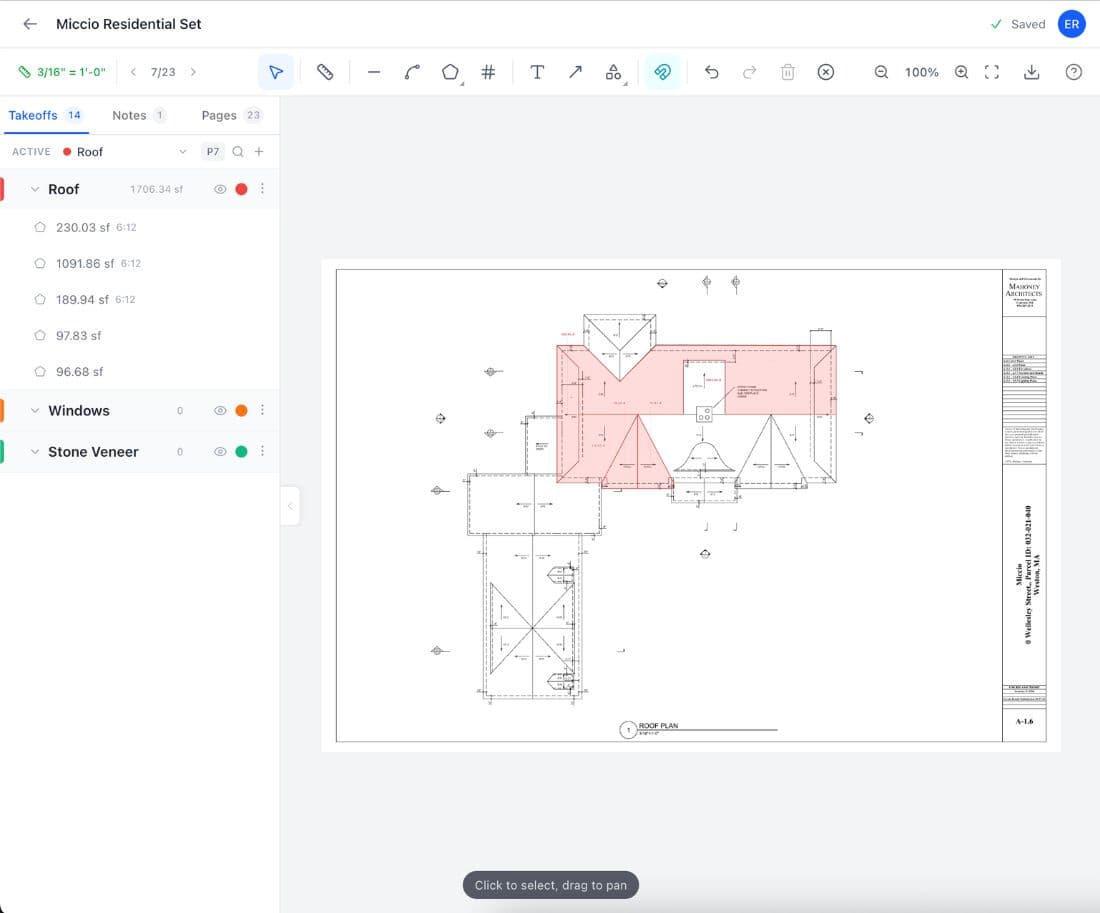
Easy Takeoffs running on iPad
How It Works

How Easy Takeoffs Works on iPad

1

Open Safari on your iPad

Tap easytakeoffs.com. No app download, no App Store, no storage used.

2

Upload or open your plans

Import PDFs from Files, iCloud, Dropbox, or email attachments. Auto scale detection calibrates your drawings.

3

Measure with touch or Apple Pencil

Tap to place points, pinch to zoom, pan with two fingers. Every measurement tool works with touch.

4

Take it to the field

Walk to the job site with your iPad. Your takeoffs sync automatically. Verify measurements against what you see.

Advantages

iPad Advantages for Takeoffs

Full-power browser app, not a stripped-down native app

Every feature that works on desktop works on iPad Safari. No feature gating, no "download the desktop version for full functionality." The same measurement tools, the same export options, the same keyboard shortcuts.

Apple Pencil for precision

Use Apple Pencil to place measurement points with pixel-level accuracy. Better than a mouse for tracing irregular shapes on complex floor plans and site drawings.

Office to field in one device

Start a takeoff at your desk, grab your iPad, drive to the job site. Verify measurements in person. No syncing, no transferring files, no second device needed.

Split View for referencing specs

Open Easy Takeoffs in one half of the screen, open the project spec book in the other. Side-by-side comparison without switching tabs or juggling windows.

Built-in camera for documentation

Snap a photo of site conditions, then switch to Easy Takeoffs to cross-reference against your plans. One device for measuring and documenting everything.

All-day battery

iPads are rated at 10 or more hours of active use. A full construction workday on a single charge. No hunting for outlets on the job site.

Which Takeoff Tools Work on iPad?

Most takeoff tools were designed for Windows desktops and never adapted to tablets. Here is what actually works on iPad and what it costs.

ToolWorks on iPad?PriceNotes
Easy Takeoffs$0/yearEvery feature, no download
BluebeamPartial$260–$440/yriOS app ($9.99) has reduced features
PlanSwift$1,749/yrWindows desktop only
On-Screen Takeoff$3,495 one-timeWindows desktop only
STACK$2,599–$3,999/yrFull cloud access, but expensive
ArcSiteSubscriptionMobile CAD, not focused on takeoffs

Which iPad Is Best for Construction Takeoffs?

Any iPad made in the last few years will run Easy Takeoffs smoothly. Here are the models that make the most sense for construction work.

ModelScreenPriceBest For
iPad (10th gen)10.9"~$349Budget option, good enough for most takeoffs
iPad Air 11"11" (M2)~$599Best value. Portable, powerful, Apple Pencil support
iPad Air 13"13" (M2)~$799Larger plans. More screen for detail work
iPad Pro 13"13" (M4)~$1,299Maximum screen. 1000-nit outdoor display. ProMotion 120Hz
Common Questions

iPad Takeoff Software FAQ

Yes, you can do full professional takeoffs on an iPad using Easy Takeoffs in Safari. The iPad runs the same browser-based application that works on desktop computers, with identical measurement tools, scale calibration, and export options. There are no stripped-down features or missing functionality. You get linear, area, polyline, rectangle, count, and angle measurement tools, automatic scale detection, measurement grouping, and the ability to export annotated PDFs or CSV spreadsheets. The iPad’s touch interface actually has some advantages over a desktop: pinch-to-zoom is faster than scroll-wheel zooming, and Apple Pencil placement is more precise than mouse clicks for tracing irregular shapes. Many contractors find that starting a takeoff in the office and then verifying it on site with the same device saves hours of back-and-forth. The key is using a browser-based tool like Easy Takeoffs rather than a native app, because native iPad apps tend to have reduced feature sets compared to their desktop counterparts.

Easy Takeoffs is the best free takeoff tool for iPad. It runs directly in Safari with no App Store download required, and it includes every measurement tool available on the desktop version: linear, area, polyline, rectangle, count, and angle measurements. You also get automatic scale detection, measurement grouping with color coding, multi-page PDF support, and export to annotated PDFs or CSV spreadsheets. There is no trial period, no feature gating, and no subscription. The touch interface works naturally on iPad: pinch to zoom, two fingers to pan, and tap to place measurement points. Apple Pencil is supported for precise point placement when tracing complex shapes. Other iPad options either cost thousands per year (STACK starts at $2,599) or are limited App Store apps that lack the full measurement capabilities of a desktop takeoff tool. Bluebeam has an iOS app, but it is a $9.99 companion with reduced functionality that does not include the full measurement suite. Easy Takeoffs provides the complete experience at zero cost because it is a web application that runs in your browser rather than a native app that has to go through the App Store.

iPad is more than good enough for construction takeoffs if you use a browser-based tool designed for it. Modern iPads run Apple’s M-series chips, the same processors used in MacBook laptops, so processing power is not a limitation. Safari on iPadOS is a desktop-class browser that handles complex web applications smoothly. The real question is screen size. A 10.9-inch iPad works well for most plans, but if you regularly work with large, detailed drawings, the 13-inch iPad Air or iPad Pro gives you significantly more space to zoom in on fine details. Apple Pencil support adds precision that is difficult to match with a mouse, especially when tracing irregular shapes like room perimeters or site boundaries. Battery life of 10 or more hours means you can work a full day without charging. The one limitation to consider is internet connectivity: Easy Takeoffs requires an internet connection, so if your job sites have poor cellular coverage, plan to do your takeoff work where you have reliable Wi-Fi or data.

Bluebeam offers an iOS app that costs $9.99 on the App Store, but it has significantly reduced functionality compared to Bluebeam Revu on desktop. The iOS app is primarily a document viewer and basic markup tool. It does not include the advanced measurement features, typewriter tool, batch processing, or custom tool chests that contractors relied on in the desktop version. You can view and annotate documents, but you cannot perform real quantity takeoffs with it. Bluebeam Cloud, the web-based product, is accessible through Safari on iPad, but it is also missing many of Revu’s core features and requires a subscription of $260 to $440 per year. Even the Cloud version lacks the count tools, volume calculations, and Quantity Link export that made Revu practical for estimating. Neither option gives iPad users the full takeoff capabilities that Revu provided on desktop. If you need dedicated takeoff tools on your iPad, including linear, area, polyline, rectangle, count, and angle measurements with automatic scale detection, Easy Takeoffs runs in Safari at no cost and provides functionality specifically designed for construction quantity takeoffs. Every feature works with touch and Apple Pencil.

No, you do not need a special app from the App Store. Easy Takeoffs runs directly in Safari on your iPad, which means there is nothing to download, nothing taking up storage on your device, and no App Store account required for installation. This is possible because Safari on iPadOS is a desktop-class browser that supports the same web technologies as Chrome or Safari on a Mac. When you open easytakeoffs.com in Safari, you get the full application with every measurement tool, scale calibration, export option, and project management feature. You can also add Easy Takeoffs to your home screen for quick access, which makes it feel like a native app while still running in the browser. The advantage of this approach over App Store apps is that you always have the latest version. There are no updates to install, no compatibility issues with iPadOS versions, and no risk of the app being discontinued from the store.

The 13-inch iPad Air or iPad Pro is the best size for construction takeoffs if you can justify the cost. The larger screen makes it significantly easier to read dimension text, identify small symbols, and work on detail drawings without constantly zooming in and out. The iPad Pro 13-inch also has a 1000-nit display that is easier to read outdoors on job sites. That said, the 11-inch iPad Air is the best value for most contractors. It has the M2 chip, Apple Pencil support, and enough screen real estate to work comfortably on most residential and light commercial plans. The 10.9-inch base iPad works fine for basic takeoffs and costs the least, making it a good option if you want a dedicated field device without spending too much. The Lenovo or keyboard case you choose matters too. A case with a built-in keyboard turns your iPad into a more comfortable workstation for extended takeoff sessions in the office.

Yes, Apple Pencil is genuinely useful for construction takeoffs and many contractors prefer it over a finger or mouse. The tip of the Apple Pencil is precise enough to place measurement points exactly where you want them, which matters when you are tracing along a wall line that runs close to other elements on a busy plan. For irregular shapes like curved walls, angled roof lines, or complex room perimeters, the pencil gives you finer control than clicking with a mouse. The precision is especially valuable when working on dense commercial plans where walls, doors, windows, and dimension lines overlap. Palm rejection means you can rest your hand on the screen while drawing, just like working on paper. You do not need to hover your hand above the glass or worry about accidental touches registering as measurement points. Apple Pencil is not required to use Easy Takeoffs on iPad. Every tool works with standard touch input. But if you do regular takeoff work on your iPad, the Pencil makes the experience noticeably more comfortable and accurate, especially on larger plan sets where precision matters. Both Apple Pencil generations and the USB-C Apple Pencil work with Easy Takeoffs.

Yes. Easy Takeoffs runs entirely in Safari on your iPad, so there is nothing to download from the App Store. Open Safari, go to easytakeoffs.com, sign in, and you have access to the full takeoff tool. Upload your PDF blueprints from the Files app, iCloud, Dropbox, email attachments, or any file source your iPad can access. The application detects the drawing’s scale automatically by reading the printed scale notation from the PDF metadata, or you can calibrate it manually by measuring a known distance on the plan. From there, you can use linear, area, polyline, rectangle, count, and angle measurement tools to quantify materials. Group your measurements by trade or material type with color coding to keep everything organized. Every measurement is saved to your project in the cloud automatically, so there is no manual save step and no risk of losing work. You can also add Easy Takeoffs to your iPad’s home screen by tapping the share button in Safari and selecting "Add to Home Screen," which gives you a one-tap shortcut that opens directly into the app and feels like a native experience.

It depends on how you work. iPad is better for portability, field verification, and quick reviews. It weighs about a pound, fits in a tool bag, has all-day battery, and the touch interface is intuitive for panning and zooming through plans. Apple Pencil adds precision that most laptop trackpads cannot match. A laptop is better for extended estimating sessions where you need a larger screen, a physical keyboard for entering notes, and the ability to run multiple applications side by side, like a spreadsheet, email, and your takeoff tool. The ideal setup for many contractors is both: do your primary takeoff work on a laptop or desktop at the office, then grab your iPad to verify measurements on site. Since Easy Takeoffs is cloud-based, your projects are available on both devices instantly. You do not need to export, transfer, or sync anything. Start on one device, continue on the other.

For construction job sites, look for a case with military-grade drop protection (MIL-STD-810G), a built-in screen protector, and a hand strap or handle for carrying. The OtterBox Defender series is one of the most popular choices among contractors because it offers three layers of drop protection, a built-in screen shield, and a stand for propping the iPad up on a table or truck tailgate. The Griffin Survivor series is another solid option with similar protection at a slightly lower price. If you work outdoors frequently, consider a case with a matte or anti-glare screen protector to reduce sun reflections. For dusty environments, a fully sealed case prevents debris from getting into ports and speakers. A shoulder strap attachment is useful if you need both hands free while walking a site. Budget about $50 to $80 for a quality rugged case. It is worth the investment when a single drop on concrete could cost you $350 to $1,300 to replace the iPad itself.

Easy Takeoffs on Other Devices

Start Your Free Construction Takeoff Today

Upload your first PDF plan set, set the scale, and pull accurate quantities before lunch. No credit card. No commitment. No per seat fees.