·15 min read
How to Do a Framing Takeoff: A Worked Lumber Example
Learn how to turn a small framing plan into a checked lumber quantity list, reconcile the pieces to stock, and review an opening revision.
Read more →The fastest way to measure construction drawings. Upload PDF plan sets, automatically set the scale & page names, and start pulling accurate measurements and counts in minutes. Built for every trade.
The tools dominating the market were designed for large general contractors with IT departments and six figure software budgets. If you run a smaller operation, you've been left with bad options.
Bluebeam Complete runs $440 a year per seat. PlanSwift Essential starts at $2,000 a year for one user. STACK Premium starts at $2,988 a year ($249 per user per month, billed annually). If you are running a crew of five and bidding residential work, those numbers eat your margins before you break ground.
Most legacy takeoff software is Windows only and locked to a single machine. You cannot open your takeoffs from the job site, pull them up at a client meeting, or hand your tablet to a foreman. Your measurements live and die on one PC.
Overcomplicated tools packed with features you will never touch. Weeks of training before you can run your first takeoff. You need to measure plans and build estimates, not earn a software certification.
Local files with no cloud backup. One hard drive failure, one stolen laptop, and months of careful takeoff work disappear. Starting over from scratch is not a business strategy.
AI names your sheets and reads the scales on upload, search finds any text or symbol across the set, then measure lengths, areas, and counts with smart snapping, organized groups, and one click export.
Drop any PDF plan set into your browser and every page renders instantly at full resolution. Multi page files, large format sheets, fine line weights, and small dimension callouts all display exactly as drawn. Zoom into details without pixelation and navigate between sheets with a single click.
Upload a plan set and every sheet names itself. AI reads each title block and labels the page by its sheet number and title, like A-101 First Floor Plan, so a 40-page set is navigable the moment it loads. Names you set yourself are always kept.
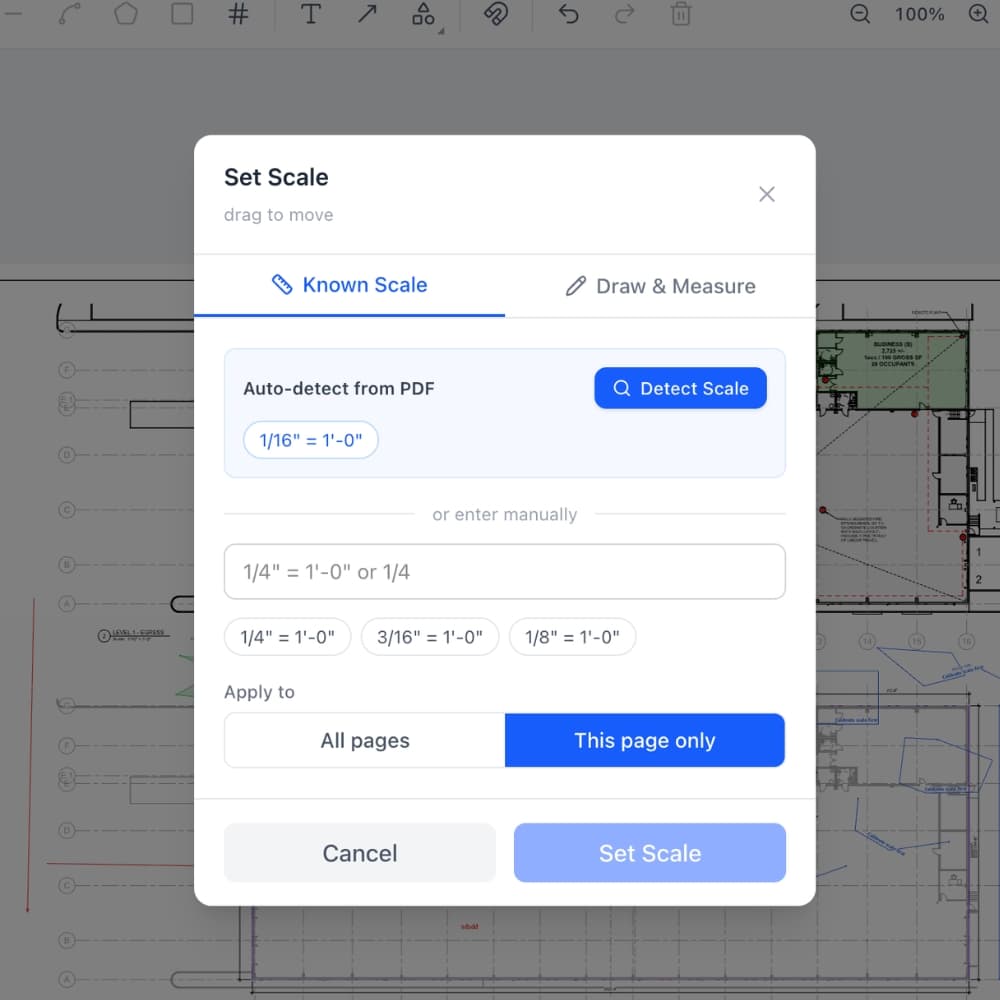
Easy Takeoffs reads the scale notation printed on each sheet and offers it in the scale menu, where one tap applies it. When a sheet has no scale text, like a scanned plan, AI reads it off the drawing and suggests it. One click sets every page in the set automatically, or type any scale from the title block.
Press Ctrl+F and find any text across the whole plan set: door tags, keynotes, equipment labels. Scanned sheets are read automatically, so an old photocopied set searches like a new one. Need a count? Draw a box around one symbol and the software finds matching copies across your sheets. Confirmed results arrive checked by default with picture previews, remain available for review or exclusion, and bulk-add as counts when you are ready.
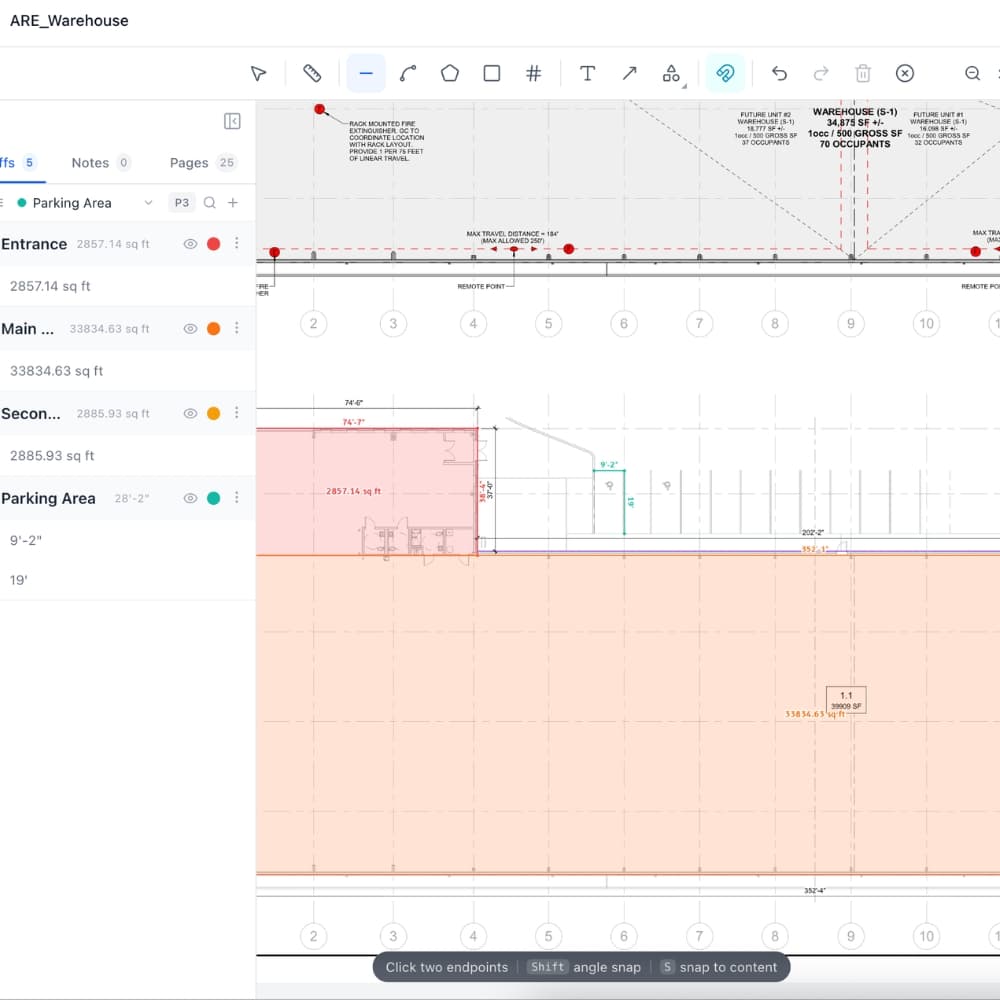
Straight lines and polylines for linear runs, polygon and rectangle tracing for square footage, circles for round areas, and count markers for fixtures and devices. Curve any segment into a true arc for curbs, radius walls, and arched drives. Running totals update in real time as you draw.
The snap engine reads the vector geometry of your PDF and locks your cursor to walls, corners, midpoints, and edges as you measure. No more guessing where a wall actually starts.
Your projects save to the cloud automatically as you measure. Start a takeoff on your desktop, review it on your tablet at the job site, check quantities on your phone. Auto save means you never lose work, even if you close the tab.
Apply assembly templates to your measurement groups and get instant material breakdowns. All 44 built-in templates cover concrete, framing, drywall, insulation, roofing, flooring, painting, electrical, plumbing, and more. Each template calculates quantities, waste, and rounding automatically as your measurements change. Build custom templates with your own formulas or browse the community library.
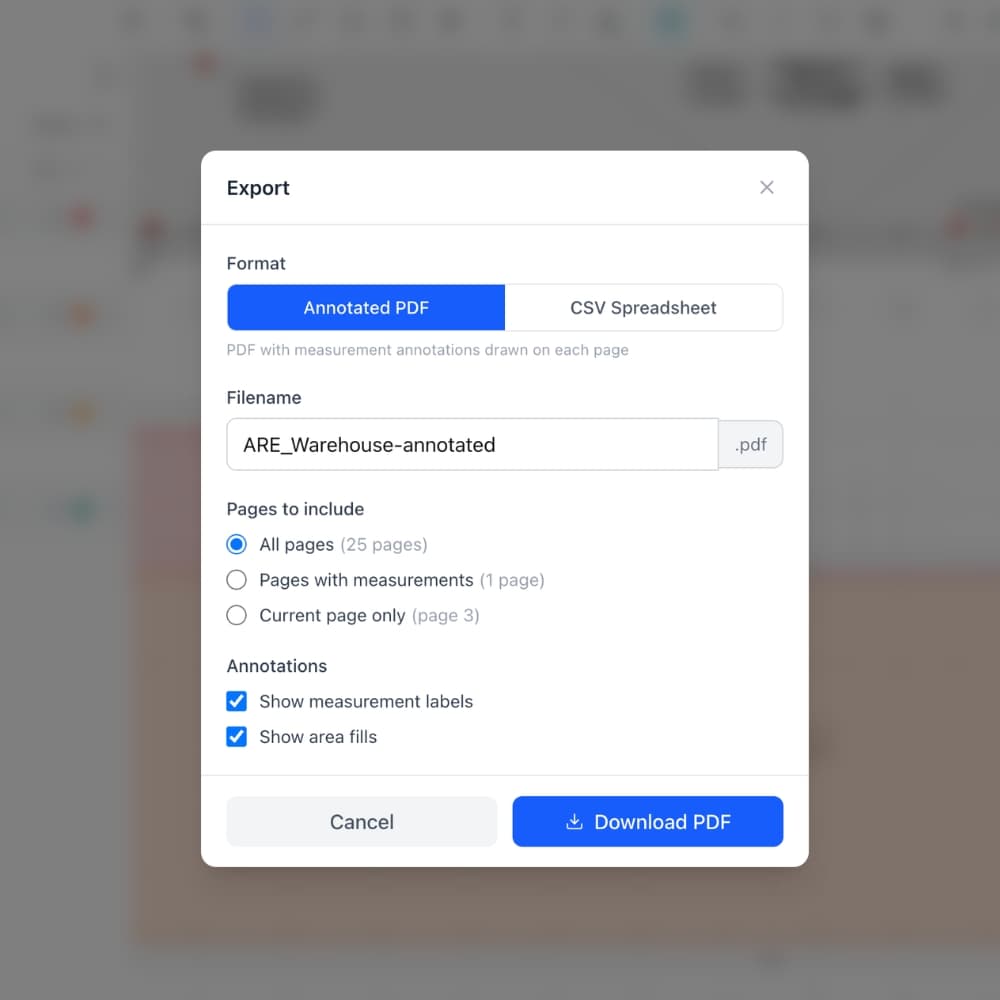
Color code measurements into groups by trade, scope, or material with running totals for each. Export an annotated PDF that ends with one Takeoff Summary of group totals and materials, or a CSV spreadsheet organized by group with subtotals, units, and material quantities.
Generate a read-only link to share your takeoff with suppliers, subs, or clients. Viewers see the full project without needing an account. Toggle sharing on and off anytime.
Easy Takeoffs was built so contractors can start measuring the moment they open a plan. No training sessions, no onboarding calls, no complicated setup. Upload your construction drawings and the tools are ready.
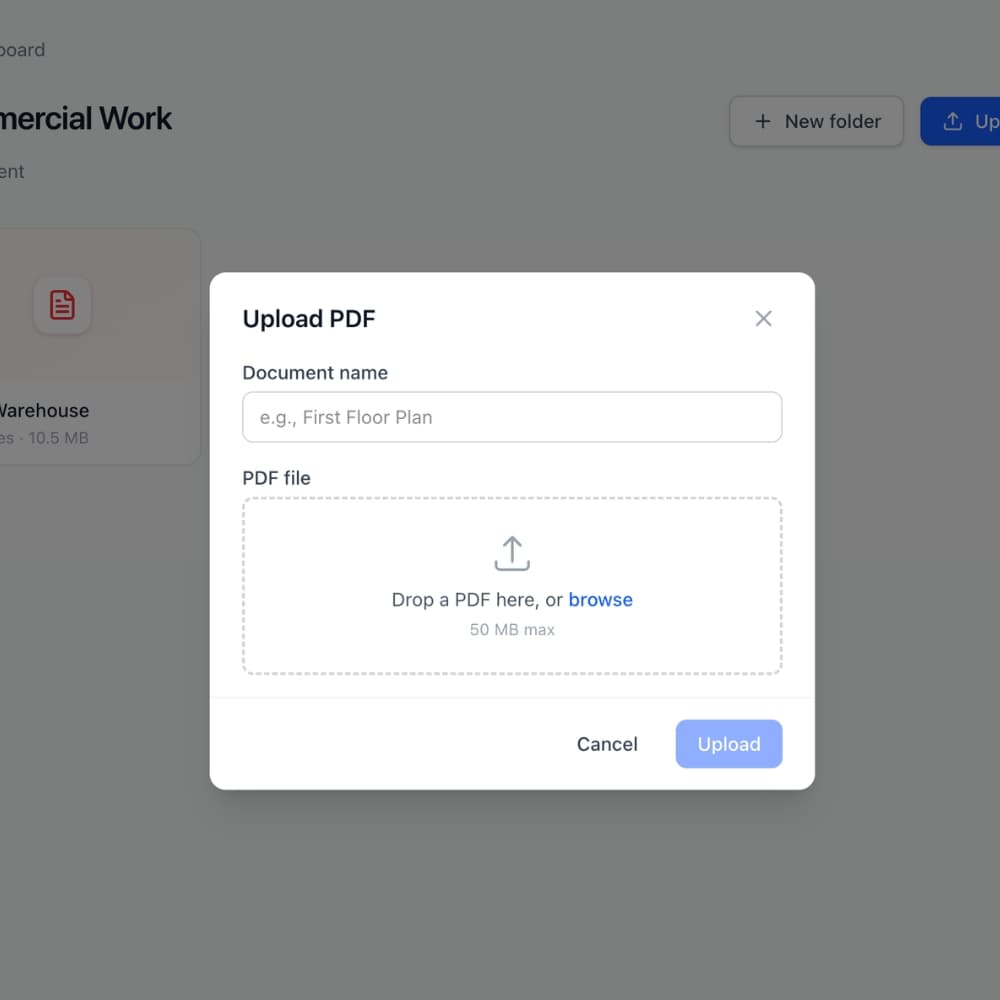
Drop a PDF into Easy Takeoffs and your entire plan set is ready to measure. Every page renders at full quality with no conversion step and no processing wait. AI names each sheet by its number and title as the set loads, and line weights, dimension callouts, and fine details stay exactly as drawn, from architectural sheets to structural details to MEP layouts.
Drop a PDF into Easy Takeoffs and your entire plan set is ready to measure. Every page renders at full quality with no conversion step and no processing wait. AI names each sheet by its number and title as the set loads, and line weights, dimension callouts, and fine details stay exactly as drawn, from architectural sheets to structural details to MEP layouts.
Easy Takeoffs reads the scale printed on each sheet and offers it in the scale menu, where one tap applies it. When a sheet has no scale text to read, like a scanned plan, AI reads the scale off the drawing and suggests it. One click on "Set all pages automatically" scales the whole set in a single run. You can also choose from dozens of standard architectural, engineering, and metric scales or type in the scale from your title block. Each page holds its own scale, so mixed scale sets are never a problem.
Easy Takeoffs reads the scale printed on each sheet and offers it in the scale menu, where one tap applies it. When a sheet has no scale text to read, like a scanned plan, AI reads the scale off the drawing and suggests it. One click on "Set all pages automatically" scales the whole set in a single run. You can also choose from dozens of standard architectural, engineering, and metric scales or type in the scale from your title block. Each page holds its own scale, so mixed scale sets are never a problem.
Use line, polyline, area, rectangle, and count tools to pull every quantity you need, with true curved segments for arcs and radius work. Snap to walls and corners for precision, organize measurements into color coded groups, and watch running totals update in real time. To count repeated symbols, draw a box around one example, review or uncheck confirmed matches, then add the checked set in one step. Undo any mistake instantly and use keyboard shortcuts to move through your plans.
Use line, polyline, area, rectangle, and count tools to pull every quantity you need, with true curved segments for arcs and radius work. Snap to walls and corners for precision, organize measurements into color coded groups, and watch running totals update in real time. To count repeated symbols, draw a box around one example, review or uncheck confirmed matches, then add the checked set in one step. Undo any mistake instantly and use keyboard shortcuts to move through your plans.
When you are done, export an annotated PDF with your markups drawn directly on the plans, or export a spreadsheet with every measurement organized by group and ready for your estimate. Share the marked up plans with your team and plug the quantities straight into your bid.
When you are done, export an annotated PDF with your markups drawn directly on the plans, or export a spreadsheet with every measurement organized by group and ready for your estimate. Share the marked up plans with your team and plug the quantities straight into your bid.
From flooring to full ground up builds, Easy Takeoffs handles the measurements your trade demands. Built for every trade, $39 a month.
Straight answers about digital takeoffs, what they cost, how they work, and why contractors are switching from scale rulers to software.
Practical guides and insights to help you measure smarter and bid with confidence.
Learn how to turn a small framing plan into a checked lumber quantity list, reconcile the pieces to stock, and review an opening revision.
Read more →Choose a takeoff program that fits the way you estimate. See what the software should handle, what it costs, and how to test it on a finished bid.
Read more →The best STACK alternatives for 2026. Verified prices, the reported 40 to 50% renewal hikes explained, and honest reviews of 8 takeoff tools.
Read more →Upload your plans, measure your quantities, and export the results. Try the full software for 14 days, then choose $39 a month or $399 a year.