Landscaping Takeoff Software
Measure planting bed areas, hardscape zones, sod footage, irrigation pipe runs, and edging lengths from PDF site plans with built-in material templates. Count trees, shrubs, and fixtures. Group by material and export quantities. Try every feature free for 14 days, $39 a month after.
Landscaping Takeoffs, Simplified
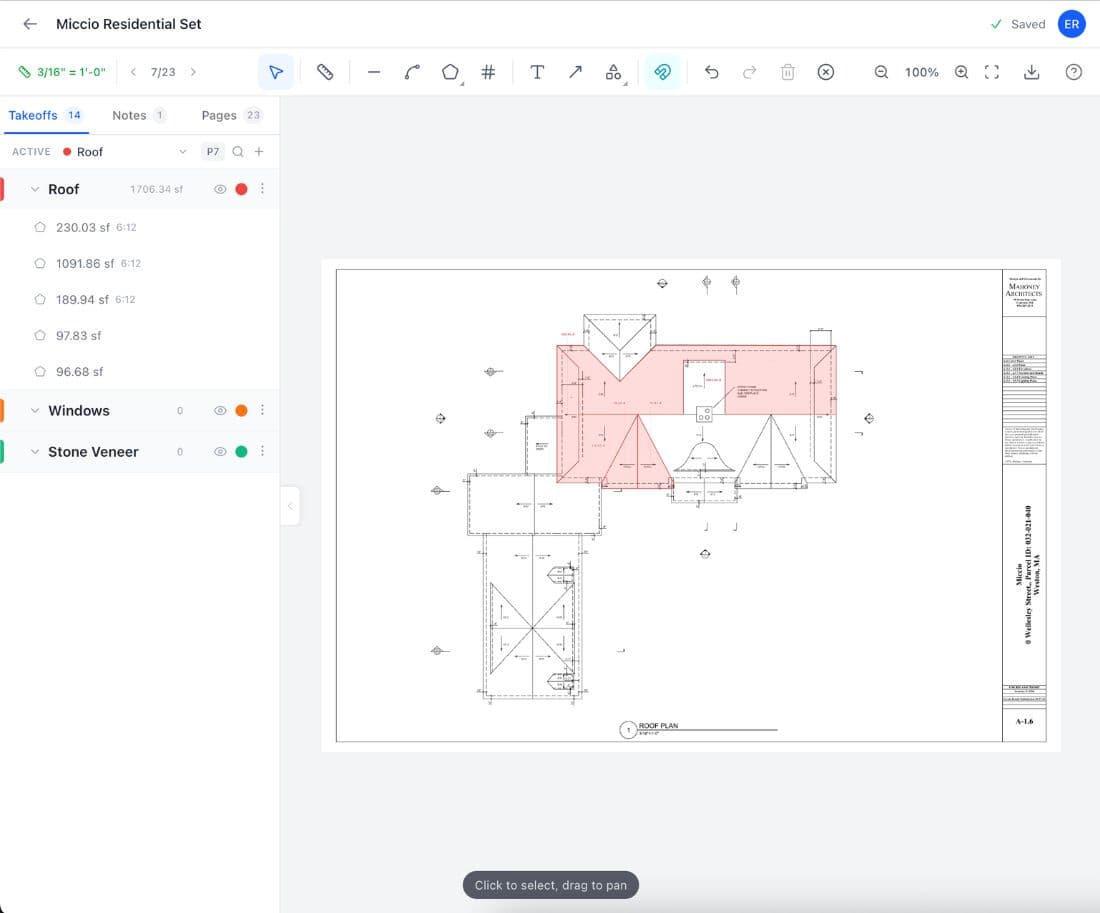
A landscaping takeoff measures planting bed areas, hardscape zones, sod footage, irrigation runs, and edging lengths, then converts each area into plant counts, paver counts, mulch volume, sod rolls, and material orders. A commercial landscape install with 12,000 square feet of sod, 3,500 square feet of mulch beds, 800 square feet of pavers, and 200 plants requires dozens of measurements from a site plan before you can price a single line item. Get the mulch bed area wrong by 15 percent and you are 2 cubic yards short at $45 per yard for premium hardwood mulch, plus a second delivery trip. Get the sod area wrong and you either have 30 rolls drying in the sun while you figure out where they go, or you are calling the sod farm for an emergency pallet that costs 20 percent more than your original order. A landscape bid touches more material categories than almost any other trade. Easy Takeoffs is landscaping bid software for $39 a month that lets you measure directly from PDF site plans. Trace planting beds, paver zones, sod areas, and gravel sections with the polygon tool. Measure irrigation main lines, lateral runs, edging, retaining wall faces, and fence lines with the linear tool. Count every tree, shrub, bollard, irrigation head, and site light with the count tool. Group measurements by material type, installation phase, or bid section. Export to CSV for material ordering, subcontractor pricing, and bid assembly. Try every feature free for 14 days, no credit card. Built-in landscaping templates for Landscape Mulch, Sod / Seeding, and Earthwork / Excavation generate material quantities from your measurements. The Landscape Mulch template calculates cubic yards, weed fabric, and edging from your bed area and target depth. The Sod / Seeding template handles sod pallets or seed pounds with optional topsoil and fertilizer. The Earthwork / Excavation template calculates cut volume and truck loads based on dig depth and soil type.
Every Measurement Type
Areas, lines, counts, angles, and true curves, plus symbol search
Snap to Walls & Corners
Cursor locks to lines, corners, midpoints, and edges
Auto Scale Detection
Reads each sheet's scale; one tap confirms, one run sets every page
$39 a month
14-day free trial, no credit card, cancel any time
Any Device
Browser-based on Mac, Windows, tablet, or phone
What Is a Landscaping Takeoff?
A landscaping takeoff is the process of measuring areas, lengths, and counts from landscape architecture plans and civil site plans to calculate the materials needed for a landscape installation. The three measurement types cover everything: area measurements for mulch, sod, pavers, gravel, topsoil, and planting bed prep; linear measurements for edging, irrigation pipe, retaining walls, curbing, and fence lines; and counts for trees, shrubs, groundcover flats, bollards, landscape lights, and irrigation heads. The takeoff feeds multiple material calculations. Mulch and topsoil convert from area to cubic yards: bed area times depth in inches, divided by 12, divided by 27. Pavers convert from area to pallets or pieces based on the product coverage per pallet. Sod converts from area to rolls or pallets based on roll size (typically 2 feet by 5 feet, or 10 square feet per roll). Irrigation pipe converts from measured run length to pipe sticks (typically 10 or 20 foot lengths) plus fittings. The plant schedule on the landscape plan shows species, size, and quantity, which the count tool verifies against the plan. A complete takeoff ensures that every material on the plan has a measured quantity before the estimate begins.
How to Do a Landscaping Takeoff
Upload site and landscape plans
Drop your PDF landscape plans, civil site plans, and irrigation plans into Easy Takeoffs. L-sheets from the landscape architect, C-sheets from the civil engineer, and irrigation details all live in one project. Navigate between sheets with the page selector.
Calibrate to site plan scale
Site plans use different scales than architectural plans: commonly 1 inch equals 10 feet, 20 feet, or 40 feet. Calibrate using a known dimension like a property line length, building footprint, or the graphic scale bar at the bottom of the drawing. Each sheet calibrates independently.
Measure beds, runs, and counts
Trace planting beds, sod zones, paver areas, and gravel sections with the polygon tool. Measure irrigation pipe, edging, retaining walls, and curbing with the linear tool. Count every tree, shrub, irrigation head, bollard, and site light with the count tool. Group each measurement by material type.
Export material quantities
Export grouped measurements to CSV. Set a depth on the mulch beds and area becomes cubic yards automatically; the built-in templates turn paver area into pallets and bed area into mulch, fabric, and edging with waste applied. Plant counts match the planting schedule. One export feeds the entire material order and bid.
Built for Landscaping
Irregular bed and zone areas
Trace curved planting beds, island planters, kidney-shaped sod areas, and free-form paver patios with the polygon tool. Where the design genuinely curves, bow any edge into a true arc so the boundary follows the landscape architect's line exactly, with the area computed from real arc math. The freehand tool covers fully organic outlines. The tool calculates the exact area regardless of shape.
Irrigation, edging, and wall runs
Measure irrigation main lines and laterals, aluminum or steel edging, retaining wall faces, and curb lengths with the linear tool. Each run shows individual and cumulative footage. Group by pipe diameter or material type for clean export totals.
Tree, shrub, and fixture counting
Count every tree, shrub, groundcover flat, bollard, irrigation head, and landscape light. Place markers precisely on the plan symbol, or box one symbol and let symbol search return confirmed matches across the sheets, checked by default for optional review before bulk addition. Group by species or size to match the planting schedule: 15 Red Maple 2-inch caliper, 40 Boxwood 3-gallon, 12 ornamental grasses.
Material and phase grouping
Group by material type: hardwood mulch beds, river rock areas, Bermuda sod zones, Belgard paver sections. Or group by installation phase: rough grade, irrigation, hardscape, planting, sod. Each group has its own color and exports with its own totals.
Auto scale detection
Most PDF site plans have the scale printed on the sheet. Easy Takeoffs reads it automatically. When no scale is printed, calibrate against the graphic scale bar or a known property dimension. Each sheet can have its own scale.
$39 a month, flat
Easy Takeoffs is the cheapest dedicated landscaping takeoff tool on the market. Landscape-specific platforms from Attentive.ai and SiteRecon charge per plan or monthly subscription. PlanSwift is $2,000 a year per seat. STACK runs $2,988 or more. Easy Takeoffs is $39 a month or $399 a year, with a 14-day free trial and no credit card. Switching from PlanSwift saves $1,532 per estimator per year on monthly billing.
Built-in Landscaping Templates
Apply Landscape Mulch, Sod / Seeding, or Earthwork / Excavation templates to your measurement groups for automatic material lists with waste factors and rounding. Adjust properties like mulch depth, seed rate, topsoil depth, or soil type to match your job. The templates calculate cubic yards, pallets, truck loads, and accessory quantities from your measured areas.
Check your quantities before you bid
Each one shows the formula and a worked example so you can check the number, not just trust it. Free, no signup. For exact quantities, measure from your plans.
Landscaping Waste Factors
Industry-standard waste percentages for common landscaping materials. Apply these to your measured quantities for accurate ordering.
Typical Waste Factors
Uneven bed depths consume more material than the calculated average. Delivery spillage at the dump site, settling after rain, and wind displacement add 8 to 12 percent. A 3-inch target depth that averages 3.3 inches across the bed wastes 10 percent.
Straight edge cuts along borders and pattern alignment waste 5 to 8 percent. Herringbone and 45-degree patterns push waste to 10 to 15 percent because every border cut is angled. Add 2 to 3 percent for breakage during compaction and cutting.
Trimming at curved bed edges, around tree rings, and along walkways wastes 3 to 7 percent. Sod that sits too long on the pallet in summer heat dies and must be replaced. Order delivery timing to match installation pace.
Bulk soil spread by skid steer or hand varies in depth across the site. Low spots and compaction during spreading consume extra volume. Compost amendments mixed into existing soil need precise volume calculation based on the amendment ratio, typically 2 to 4 inches tilled into 6 inches of native soil.
Direction changes, fittings, and cut waste at the end of each stick add 3 to 7 percent. PVC sticks come in 10 or 20 foot lengths. A 27-foot run uses two 20-foot sticks with 13 feet of usable scrap or three 10-foot sticks with 3 feet of scrap.
Edging comes in straight sections (typically 8 or 16 feet) with overlap connectors. Waste is minimal and comes only from end cuts at transitions and overlap joints. Budget 3 percent for connector overlaps and end trimming.
Bulk aggregate spread by hand or machine varies in depth. Settling after initial installation reduces the apparent coverage by 10 to 15 percent. River rock and decorative stone are more expensive per cubic yard than mulch, so accurate area measurement matters more.
Why Landscaping Contractors Need Better Takeoffs
Curved beds and irregular site shapes do not scale by hand
A residential landscape plan has kidney-shaped planting beds, curved paver patios, and free-form sod areas. None of these are rectangles. Scaling a curved bed with a ruler and calculator means breaking it into dozens of small rectangles, calculating each one, and summing them. Miss one section and you are 50 to 100 square feet short on mulch. At 3 inches deep, 100 square feet is nearly a cubic yard of mulch at $45 per yard. A polygon tool traces the actual shape in seconds.
One site plan with five different material types
A single landscape sheet might show mulch beds, gravel walkways, sod lawn, a paver patio, and a dry-stack stone wall. Without measurement groups, you end up with a combined area total and no idea how much of it is mulch versus gravel versus sod. You have to go back to the plan and re-sort. Grouping by material in Easy Takeoffs means each material has its own running total from the start, and the CSV export is already organized for ordering.
Counting 200 plants from a paper plan takes an hour
A commercial landscape plan with 30 shade trees, 80 shrubs, 60 ornamental grasses, and 200 flats of groundcover requires counting every symbol on the plan and cross-referencing the plant schedule. Doing this by hand with a highlighter takes an hour or more. Miscount 10 boxwoods at $35 each and your bid is $350 off on just one species. The count tool in Easy Takeoffs places markers on the plan and totals them by group in seconds.
Common Landscaping Takeoff Mistakes
Calculating mulch at flat average depth
Landscape plans specify a 3-inch mulch depth, so you calculate bed area times 3 inches. But mulch settles into soil depressions, mounds around plant root balls, and fills deeper at bed edges where the edging creates a lip. Real average depth is closer to 3.3 to 3.5 inches. On a 3,000 square foot bed, the extra 0.3 to 0.5 inches adds 1 to 1.5 cubic yards at $45 each. Add 10 percent waste to your calculated volume for depth variation, delivery spillage, and settling. Order an extra half yard on any delivery under 10 yards.
Ordering sod by area without checking pallet coverage
Sod coverage per pallet varies by region and farm. One farm's pallet covers 450 square feet. Another covers 500 or 600 square feet. Assuming 500 when the actual coverage is 450 means you are short by 10 percent on every pallet. On a 5,000 square foot lawn, that is 500 square feet of missing sod and a bare patch the client notices immediately. Confirm the pallet coverage with your sod supplier before ordering. Calculate total pallets needed: area divided by pallet coverage, rounded up, plus 5 percent waste for trimming.
Ignoring irrigation head counts in the takeoff
The irrigation plan shows head locations, pipe runs, and zone layouts. Contractors often measure pipe footage and forget to count the heads. Each rotor head costs $15 to $30. Each spray head costs $5 to $12. A 10-zone residential system with 80 spray heads and 20 rotors is $400 to $1,560 in heads alone. Missing the count means missing a significant portion of the material cost. Count every irrigation head by type using the count tool. Group spray heads, rotor heads, drip emitters, and valve boxes separately. Export the counts alongside pipe footage for a complete irrigation material list.
Not accounting for hardscape base material
A paver patio needs more than just pavers. A standard installation requires 4 to 6 inches of compacted aggregate base and 1 inch of bedding sand. An 800 square foot patio needs 10 to 15 cubic yards of aggregate base at $25 to $40 per yard and 2.5 cubic yards of bedding sand at $30 to $45 per yard. That is $325 to $713 in base material not in the bid if you only measured the paver area. For every paver area measurement, calculate base and sand volume separately. Base volume: area times base depth divided by 27. Sand volume: area times 1 inch divided by 324.
Mixing up bed prep area with planting area
The landscape plan shows planting beds, but the bed prep area (tilling, amending, grading) is often larger than the planted area because prep extends to the bed edges and beyond the outermost plants. A planting bed with 15 shrubs might have 400 square feet of planting area but 500 square feet of prep area. Bidding soil amendment, tilling, and grading on the planted area misses 100 square feet of prep. Measure the full bed outline for prep quantities and the individual plant locations for plant counts. They are different measurements with different purposes.
Landscaping Takeoff Pro Tips
Group by material type for ordering and by phase for scheduling
Create two sets of measurement groups. First, group by material: hardwood mulch, river rock, Bermuda sod, Belgard Holland pavers, and Techo-Bloc wall stone. These totals feed directly into your supplier orders. Second, create groups by installation phase: rough grading, irrigation rough-in, hardscape, planting, mulch, and sod. The material groups answer "how much of each material do I need to order?" The phase groups answer "how much work is in each phase for labor scheduling?" Both come from the same measurements, just organized differently. Export both and you have your material order list and your crew schedule from one takeoff. For large commercial projects, phase grouping also supports progress billing. If Phase 1 is rough grade and irrigation, you can invoice for Phase 1 quantities as soon as that phase is complete.
Verify the plant schedule against the plan
The plant schedule in the landscape specs lists species, size, and quantity. The landscape plan shows the planting symbols on the site. These should match, but they frequently do not. The landscape architect may have moved plants after updating the schedule, or the plan may show 22 boxwoods while the schedule says 20. Use the count tool to count every plant symbol on the plan, grouped by species. Compare your counts to the plant schedule. If they do not match, issue an RFI before bidding. Bidding the plan count when the schedule says a different number creates a change order argument later. For commercial projects, the plant schedule is the contractual quantity. Your takeoff from the plan is a verification. If the plan shows more plants than the schedule, you are not being paid for the extras unless you flag it.
Calculate mulch and soil by the delivery truck, not just cubic yards
Bulk mulch and topsoil are delivered in dump trucks, and truck capacity determines your delivery logistics. A standard single-axle dump truck holds 8 to 12 cubic yards. A tandem holds 12 to 16 yards. A tri-axle holds 16 to 22 yards. If your takeoff shows 28 cubic yards of mulch, that is two tandem deliveries or three single-axle loads. Knowing the delivery count matters for scheduling. Each delivery needs someone to direct the driver and a staging area to dump. On a tight residential site with limited access, a tri-axle may not fit. You need three single-axle loads instead, which is three delivery fees instead of one. Price your deliveries based on truck size and quantity. Many suppliers include delivery in the per-yard price for orders over a minimum (often 5 yards). Below that, expect a $50 to $100 delivery charge.
Measure irrigation by zone, not just total footage
Create a measurement group for each irrigation zone: "Zone 1 - Front Lawn Rotors," "Zone 2 - Front Beds Drip," "Zone 3 - Side Yard Spray." Measure the pipe runs and head counts per zone. This gives you pipe footage per zone for wire sizing (you need a dedicated wire pair from the controller to each zone valve). Zone-based measurement also catches design errors. If Zone 3 has 15 spray heads but the controller only supports 12 heads per zone at the available water pressure, you know to flag it before installation. Fixing a zone design on paper costs nothing. Fixing it after trenching costs $500 to $1,000 in rework. Export zone-by-zone quantities for your irrigation material list. Each zone needs its own valve, wire run from the controller, and the correct pipe diameter for the head count and flow rate.
Use the polygon tool for sod and seed areas, not just beds
Sod and seed areas are often everything "not" something else: the lawn is whatever is left after subtracting the house footprint, driveway, walkways, patios, and planting beds. Trying to calculate lawn area by subtraction is error-prone because you are dealing with multiple irregular shapes. Instead, trace the actual sod boundary with the polygon tool. Click around the lawn perimeter, including the cutouts around beds and hardscape. The polygon tool handles donut-shaped areas and irregular outlines. The calculated area is the actual sod coverage, not an estimate by subtraction. For seeded areas, the same approach works. Trace the seed boundary and get the square footage for calculating pounds of seed. Seed application rates vary by species: Kentucky Bluegrass at 2 to 3 pounds per 1,000 square feet, Bermuda at 1 to 2 pounds, and Fescue at 6 to 8 pounds.
Landscaping Takeoff Questions
Start Your Construction Takeoff Today
Upload your plans, measure your quantities, and export the results. Try the full software for 14 days, then choose $39 a month or $399 a year.