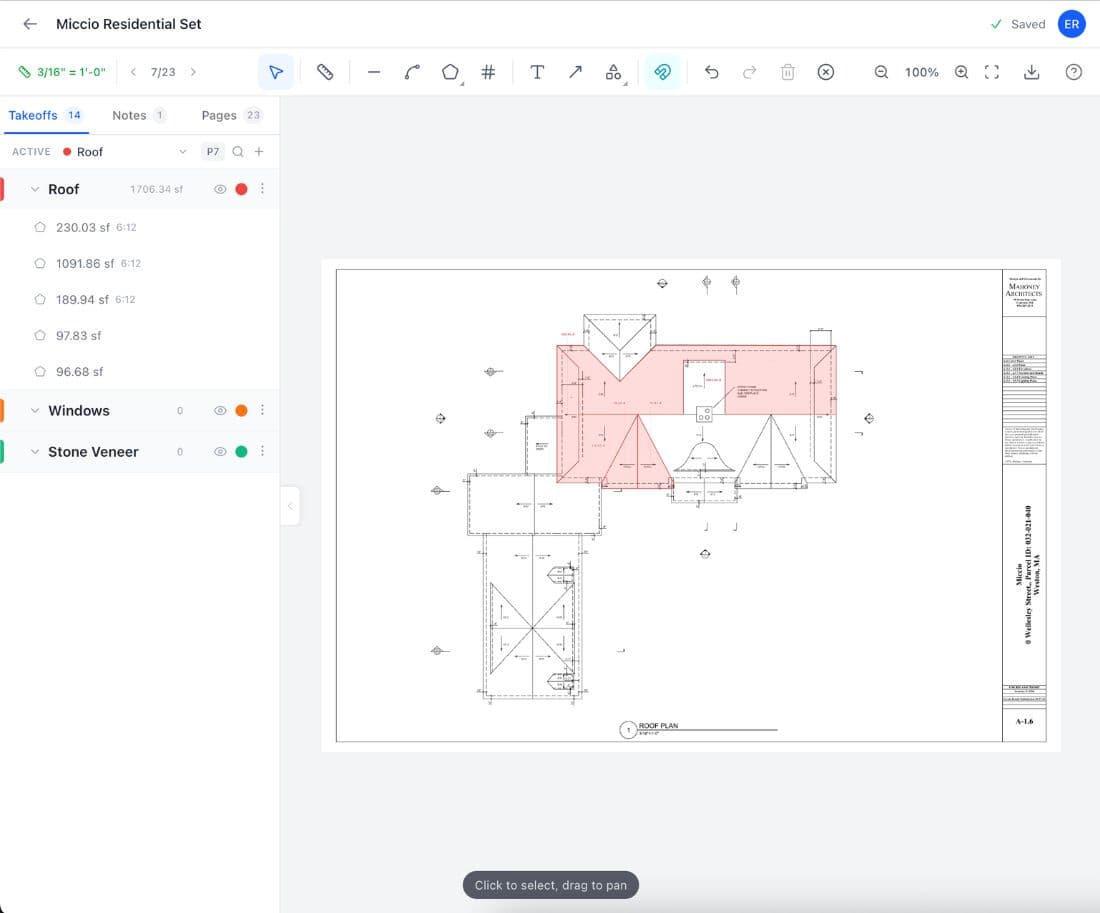
Free Takeoff Software for Windows
PlanSwift costs $1,749 a year. Bluebeam runs $260 to $440. Easy Takeoffs is free, runs in your browser on any Windows PC, and has nothing to install, no license to manage, and no admin rights required.
Windows Takeoff Software Is Expensive and Getting Worse
Windows is the default platform for construction takeoff software, and it has been for two decades. PlanSwift, On-Screen Takeoff, and Bluebeam Revu were all built as Windows desktop applications. The problem is not compatibility. The problem is what that software costs and what it demands from you to keep it running. PlanSwift charges $1,749 per year and requires Windows Pro, not the Home edition that ships on most laptops. On-Screen Takeoff needs admin privileges to install and validates its license online every 30 days. Bluebeam Revu requires a GPU with OpenGL 3.2 support, and contractors report freezing, blank tabs, and system slowdowns from .NET conflicts even when Revu is closed.
The licensing situation keeps getting worse. PlanSwift used to sell perpetual "lifetime" licenses. In 2025, they told existing holders those licenses are no longer supported and moved everyone to annual subscriptions. Contractors who paid thousands for permanent access had it pulled out from under them. One documented case: a contractor bought two perpetual seats, was told years later to pay annually, negotiated to pay for one, and PlanSwift deactivated the other without warning.
Easy Takeoffs avoids all of this. It runs in your browser with no software to install, no license server to contact, no GPU requirement, no admin privileges needed, and no annual fee. Open Chrome or Edge, sign in, and measure.

How Easy Takeoffs Works on Windows
Open Chrome or Edge
No download. No installation wizard. No admin rights. Go to easytakeoffs.com and sign in.
Upload your PDF plans
Drag and drop from File Explorer. Auto scale detection reads the scale bar from your drawings.
Measure with any tool
Linear, polyline, area, rectangle, count, and angle tools. Full keyboard shortcuts. Works the same as on any other device.
Export and order materials
Download annotated PDFs or CSV spreadsheets. Open the CSV in Excel for material ordering and cost estimating.
Windows Advantages for Takeoffs
No license fee, no subscription
PlanSwift charges $1,749 per year. Bluebeam runs $260 to $440. STACK starts at $2,599. Easy Takeoffs is free. The money you save in one year covers a new laptop.
No installation, no admin rights
Desktop takeoff software requires downloads, installation wizards, and often administrator privileges. Easy Takeoffs runs in your browser. If you can open a website, you can run your takeoffs. Works on company laptops, shared computers, and locked-down machines.
Always the latest version
No update pop-ups, no version conflicts, no reinstalling after a Windows update breaks something. Every time you open Easy Takeoffs, you are on the latest version automatically. No downtime, no compatibility patches.
Works on any Windows version
Windows 7, 8, 10, 11. Home or Pro. Easy Takeoffs runs in the browser, so the Windows version does not matter. PlanSwift requires Windows Pro. Bluebeam requires Windows 10 or later. Easy Takeoffs just needs a browser.
Runs on budget hardware
Bluebeam recommends an Intel i5 with 8GB RAM and an OpenGL 3.2 GPU. PlanSwift recommends a dedicated processor with 4GB RAM. Easy Takeoffs runs on any PC that can open Chrome, including that five-year-old laptop in your truck.
CSV export to Excel
Export your takeoff measurements to CSV and open directly in Excel for material ordering, cost tracking, and bid preparation. Group totals, measurement labels, and quantities are all included.
Which Takeoff Tools Work on Windows?
Windows is the home turf for desktop takeoff software. But "works on Windows" and "worth the money on Windows" are two different things. Here is what each tool costs.
| Tool | Works on Windows? | Price | Notes |
|---|---|---|---|
| Easy Takeoffs | ✓ | $0/year | Browser-based. No install needed. |
| Bluebeam Revu | ✓ | $260–$440/yr | Desktop app. Requires OpenGL 3.2 GPU. |
| PlanSwift | ✓ | $1,749/yr | Desktop app. Requires Windows Pro (not Home). |
| On-Screen Takeoff | ✓ | ~$1,044/yr | Desktop app. Requires admin rights to install. |
| STACK | ✓ | $2,599–$3,999/yr | Cloud-based. Works in any browser. |
| Procore | ✓ | $20,000+/yr | Cloud-based. Enterprise platform, overkill for takeoffs. |
What Takeoff Software Actually Costs on Windows
Every major takeoff tool runs on Windows. But the annual cost of a license can exceed the cost of the computer it runs on. Here is the math.
PlanSwift on Windows
Bluebeam on Windows
Easy Takeoffs on Windows
Windows Takeoff Software FAQ
Easy Takeoffs is the best free takeoff software for Windows. It runs in Chrome, Edge, or Firefox with no download or installation required. You get linear, area, polyline, rectangle, count, and angle measurement tools, automatic scale detection from PDF plans, measurement grouping with color coding, and export to annotated PDFs or CSV spreadsheets. There is no trial period, no feature gating, and no credit card required. Your projects save automatically to the cloud, so you can access them from any computer. Most other takeoff tools on Windows carry significant annual costs: PlanSwift costs $1,749 per year, Bluebeam runs $260 to $440, STACK starts at $2,599, and On-Screen Takeoff runs about $1,044 per year. Some of these also have hardware requirements that your current PC may not meet. Easy Takeoffs works on any Windows computer that can run a modern browser, regardless of your Windows version, processor, GPU, or amount of RAM.
No. Easy Takeoffs requires zero installation on Windows. Open Chrome, Edge, or Firefox, go to easytakeoffs.com, and sign in with your email. The entire application runs in your browser. There is no .exe file to download, no installation wizard to click through, no administrator password required, and no system requirements beyond having a browser that supports modern web standards. This is a practical advantage in situations where desktop software creates friction: company laptops with IT restrictions that block installations, shared office computers where you do not have admin rights, or older machines where you do not want to install more software. Your takeoff projects save to the cloud, so you can start a takeoff on your office desktop, continue it on your laptop at home, and review it on your phone at the job site. All without installing anything on any of those devices.
PlanSwift is a Windows desktop application that costs $1,749 per year and requires Windows Pro (not the Home edition that ships on most consumer laptops). It installs locally and includes trade-specific plug-in modules for roofing, concrete, electrical, and other trades at additional cost. Easy Takeoffs is a free browser-based tool that runs on any Windows version without installation. It includes linear, area, polyline, rectangle, count, and angle measurement tools, automatic scale detection, measurement grouping, and CSV/PDF export. PlanSwift has been around for over 15 years and has deeper trade-specific automation for large commercial estimating workflows. It can import material databases and generate cost estimates within the application. Easy Takeoffs focuses on the measurement and quantification side of takeoffs, which is what most small to mid-size contractors need. You measure your plans, export the quantities, and do your pricing in a spreadsheet or estimating tool. For contractors bidding residential and light commercial work, Easy Takeoffs covers the takeoff workflow at zero cost. For large GCs running multi-million dollar commercial estimates with integrated cost databases, PlanSwift or a platform like STACK may be more appropriate.
Bluebeam Revu is a PDF markup and collaboration tool that includes measurement features among many other capabilities. It costs $260 to $440 per year depending on the tier and runs only on Windows as a desktop application. It requires a GPU supporting OpenGL 3.2 and has documented issues with .NET Framework conflicts, freezing during sessions, and performance problems on certain GPU and monitor configurations. Easy Takeoffs is a free browser-based tool focused specifically on construction takeoffs. It does not try to be a full PDF editor or document management system. Where Bluebeam offers markup tools, document comparison, batch processing, and Studio sessions for collaboration, Easy Takeoffs focuses on measuring plans quickly and accurately: linear, area, polyline, rectangle, count, and angle tools with automatic scale detection. If your primary need is measuring PDF plans and exporting quantities for bidding, Easy Takeoffs handles that workflow without the complexity or cost of Bluebeam. If you need Bluebeam for its broader document management capabilities (RFI tracking, studio sessions, custom tool chests), that is a different use case.
Yes. Easy Takeoffs works on Windows 10, Windows 11, and even older versions like Windows 8 and 7. Because it runs in a web browser rather than as installed software, the specific Windows version does not matter. As long as your PC can run a modern version of Chrome, Edge, or Firefox, Easy Takeoffs will work. This is relevant because Microsoft ended support for Windows 10 in October 2025, which means no more security updates unless you pay for Extended Security Updates ($61 per device for the first year, doubling each year after that). Roughly 400 million Windows PCs cannot upgrade to Windows 11 because they lack the TPM 2.0 hardware requirement. Many small contractors are still running Windows 10 on perfectly functional machines. Desktop takeoff software like PlanSwift and Bluebeam require Windows 10 or later and may eventually drop support for it. Browser-based tools do not have this dependency. Even if you stay on Windows 10 or use an older machine, Easy Takeoffs will continue to work as long as your browser stays updated.
PlanSwift costs $1,749 per year per license. The pricing reflects the product’s position as a legacy desktop tool built for large commercial estimating workflows with integrated material databases and trade-specific plug-in modules. It originally sold perpetual licenses at a one-time cost, but in 2025 PlanSwift moved all users to annual subscriptions, including existing perpetual license holders who had already paid for "lifetime" access. The $1,749 annual price does not include trade-specific plug-ins (roofing, electrical, concrete, etc.), which cost extra. It also requires Windows Pro, not the Home edition, which may require a $99 upgrade if your PC shipped with Home. For many small contractors bidding on residential and light commercial work, $1,749 per year is hard to justify when the primary need is measuring plans and exporting quantities. That is a measurement workflow, and browser-based tools like Easy Takeoffs handle it at no cost. The question worth asking is whether you need PlanSwift’s deep estimating features or whether you need a tool that measures plans accurately and exports the numbers to your spreadsheet.
Yes. Because Easy Takeoffs runs in a browser tab, it works alongside anything else on your Windows PC without interference. You can have Easy Takeoffs open in one window and Excel in another, copying measurements into your estimating spreadsheet as you go. You can tile the browser and your spec book PDF side by side. You can run it in the background while using AutoCAD, Revit, or any other desktop application. Unlike desktop takeoff software, Easy Takeoffs does not install drivers, .NET dependencies, or background services that can conflict with other programs. Bluebeam Revu is known to cause system-wide slowdowns on some machines due to .NET Framework conflicts, even when Revu is not the active window. Easy Takeoffs runs in a sandboxed browser tab that has zero impact on the rest of your system. If Chrome or Edge is already open, which it probably is, then Easy Takeoffs adds one more tab with no additional system overhead beyond what that tab uses.
The only requirement is a modern web browser: Chrome, Edge, or Firefox. If your Windows PC can browse the internet, it can run Easy Takeoffs. There is no minimum processor, RAM, GPU, or storage requirement beyond what the browser itself needs. For context, Bluebeam Revu requires an Intel i5 processor, 8GB of RAM, and a GPU supporting OpenGL 3.2. PlanSwift requires Windows Pro (not Home), 4GB of RAM, and 200MB of free disk space. On-Screen Takeoff requires 4GB of RAM, an Intel i5, and local administrator privileges to install. Easy Takeoffs has none of these requirements. It runs on budget laptops with 4GB of RAM and Intel Celeron processors. It runs on ten-year-old desktops. It runs on Windows tablets. If the machine can display a web page, it can run your takeoffs. This makes it practical for contractors who use whatever computer they have available rather than buying hardware to meet specific software requirements.
Yes. Measurement accuracy depends on the scale calibration, not on whether the software is installed or browser-based. Easy Takeoffs uses the same mathematical approach as desktop tools: you set the scale (either automatically from the PDF metadata or manually by measuring a known distance on the plan), and then every measurement is calculated based on that scale. The precision of the underlying calculations is identical. PDF rendering in the browser uses the same PDF.js library that powers Firefox’s built-in PDF viewer. It reads the vector data from your PDF files at full resolution, so there is no loss of quality compared to desktop rendering. Zoom into the finest dimension text on your plans and it renders at the same clarity as any desktop application. The tools, the calculations, and the exports are functionally equivalent. The differences between Easy Takeoffs and desktop software like PlanSwift or Bluebeam are about additional features (cost databases, trade plug-ins, document management) and workflow integration, not about measurement accuracy.
Yes. Each person on your team creates their own free account at easytakeoffs.com. There is no per-seat license to purchase, no license server to manage, and no limit on how many people at your company can use it. Each person signs in on their own Windows PC and has their own projects. You can share takeoffs with team members by generating a shareable link from any project. Anyone with the link can view the full project, including the PDF, all measurements, group totals, and annotations, without needing their own account. This makes it easy to send a completed takeoff to a project manager for review, to a supplier for a material quote, or to a foreman on the job site for verification. For desktop takeoff software, adding a team member means buying another license: $1,749 per year per seat for PlanSwift, $260 to $440 for Bluebeam, $2,599 or more for STACK. A five-person estimating team on PlanSwift costs nearly $9,000 per year in software alone.
Easy Takeoffs on Other Devices
Start Your Free Construction Takeoff Today
Upload your first PDF plan set, set the scale, and pull accurate quantities before lunch. No credit card. No commitment. No per seat fees.