Bluebeam vs Easy Takeoffs
Bluebeam Revu and Easy Takeoffs approach construction takeoffs from opposite directions. Bluebeam is a powerful PDF markup and collaboration suite with a Windows-only Revu desktop app plus web and mobile access. Easy Takeoffs is purpose-built for takeoffs alone, fast to learn, and runs in a browser on Mac, Windows, or iPad. Here is an honest, side-by-side look at where each one wins.
Why Contractors Switch from Bluebeam Revu
If you are searching for a Bluebeam alternative or evaluating Bluebeam competitors for construction takeoffs, start with the workflow you actually use. Bluebeam Basics includes length and area measurements, Core adds the full Revu measurement set, and Complete at $440 adds Quantity Link, Dynamic Fill, and batch automation. That breadth is valuable for teams using Bluebeam as a PDF and collaboration platform, but it can be more interface and product scope than a contractor who mainly measures plans needs.
Easy Takeoffs is built to be the simplest construction takeoff tool on the market and $41 cheaper than Bluebeam Complete on annual billing. It runs in any browser on any operating system. Bluebeam also offers web and mobile access, but its full Revu desktop application has no current Mac version. The Easy Takeoffs interface is focused on one job: measuring construction drawings quickly and accurately. No dense toolbars, no months of training, $39 a month or $399 a year, 14-day free trial, no credit card. This page is an honest, side-by-side comparison so you can decide which tool fits your workflow and your budget.
What Is Bluebeam Revu?
Bluebeam Revu is a PDF markup and collaboration platform developed by Bluebeam, Inc. (a Nemetschek company). It is widely used in architecture, engineering, and construction for document review, markups, punch lists, and studio-based collaboration. Bluebeam includes measurement tools for takeoffs, but it was designed primarily as a PDF productivity suite for AEC professionals, not as a purpose-built takeoff tool for contractors.
What Is Easy Takeoffs?
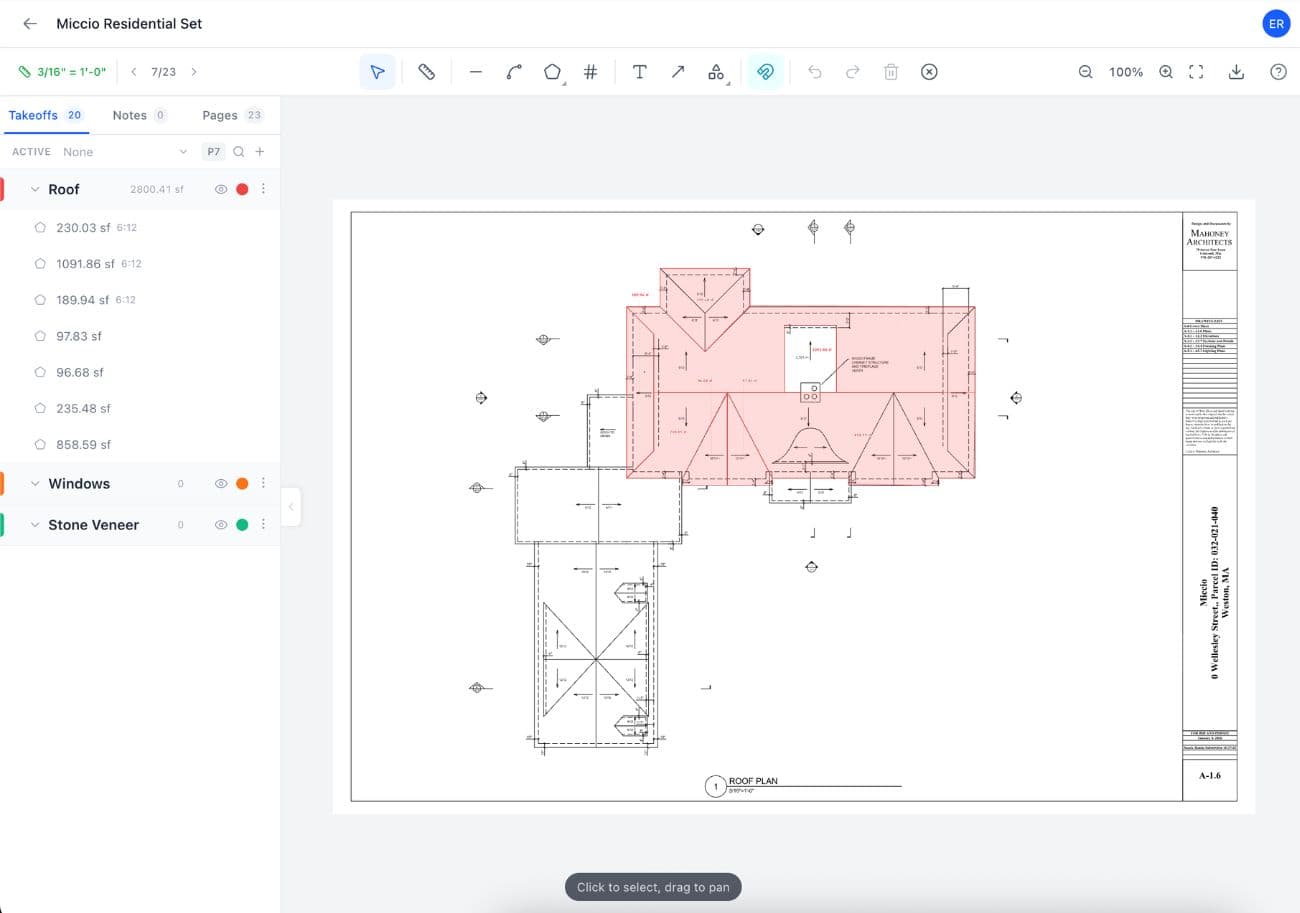
Easy Takeoffs is a simple, low-cost construction takeoff tool that runs in any browser on Mac, Windows, ChromeOS, Linux, and iPad. There is nothing to install. The interface is built around one job: measuring construction drawings. Upload a PDF, confirm the scale the software detects on each sheet (or set every page in one run), and start measuring with linear, polyline, polygon, rectangle, circle, freehand, count, and angle tools, with true curved segments for arcs and radius walls. Search any sheet for text the way you would a website, scanned pages included, or draw a box around one symbol and review or uncheck confirmed results before adding the checked set as counts. Snap to lines and corners on the drawing for precision. Apply any of the 44 built-in material templates to turn measurements into drywall sheets, concrete cubic yards, paint gallons, or any custom formula you write, or browse the community library for templates other contractors have shared. Group your measurements with color coding and sub-groups, mark up the plans with thirteen annotation tools with grab-handle reshaping on eleven, export to annotated PDF or CSV with a Takeoff Summary of group totals and materials, and share read-only links anyone can open without an account.
What Bluebeam Revu Users Run Into
The most common reasons contractors look for a Bluebeam Revu alternative, drawn from verified reviews on G2, Capterra, Trustpilot, and Reddit.
Expensive for what you actually use
Bluebeam Revu starts at $260/year for the Basics tier and goes up to $440/year for Complete. Most contractors use less than 20% of its features. You are paying for PDF editing, Studio Sessions, and enterprise document management when all you need is accurate measurements on a construction drawing.
“I use maybe 10% of what Bluebeam can do. The rest is bloat I'm paying for.”
G2 Review
Steep learning curve
Bluebeam was designed for architects and engineers managing complex document workflows. Contractors report spending weeks learning the interface before becoming productive with takeoffs. The toolbar is dense with options most takeoff users never touch. Training sessions and onboarding are often required before teams can use it independently.
“The learning curve is steep. It took our team months to get comfortable.”
Capterra Review
No current Revu desktop app for Mac
Bluebeam discontinued Revu for Mac in June 2023, so the full Revu desktop application now requires Windows. Bluebeam subscribers can still use Bluebeam on the web from a Mac and use its iOS and Android apps, including markup, measurements, Studio Sessions, and Studio Projects. Contractors who need the full Revu desktop toolset on a Mac still need a Windows machine or virtualization, while contractors whose workflow fits the web app do have a supported Mac path.
“When they dropped Mac support, we had to find something else. Can't ask my team to switch operating systems.”
Reddit r/Construction
Subscription prices keep rising
Bluebeam switched to subscription-only pricing in 2023, eliminating perpetual licenses that many contractors relied on. Then in June 2024, they raised prices by 10% across all tiers. The new Bluebeam Max AI tier now tops the ladder at $590 per user per year. For contractors watching their overhead, the trend is clear: more money every year for the same core takeoff features.
Easy Takeoffs vs Bluebeam Revu
A side-by-side look at what each tool offers. We include features where Bluebeam Revu has the advantage, because an honest comparison builds more trust than a cherry-picked one.
No credit card, no install, no enterprise contract.
Simpler to Use, and Runs on Mac
Bluebeam Revu Complete, the tier with Quantity Link, Dynamic Fill, and batch automation, is $440 per user per year. The newer Bluebeam Max AI tier sits above Complete at an introductory $590. Easy Takeoffs is $39 a month or $399 a year, which is $41 cheaper than Bluebeam Complete on annual billing and includes a 14-day free trial with no credit card required. Both products have cross-device access: Easy Takeoffs runs in a browser on Mac, Windows, iPad, and Chromebook, while Bluebeam plans include web and mobile apps alongside the Windows-only Revu desktop application. Mac users who require Revu desktop still need Windows or virtualization; users whose work fits Bluebeam on the web have a supported browser path.
Easy Takeoffs
Cheapestin the category
- ✓$39/mo or $399/yr
- ✓Simple, easy to learn in minutes
- ✓Runs on Mac, Windows, iPad
- ✓Every measurement tool included
Bluebeam Revu
$440/year
Per user, per year. Annual contract.
Bluebeam Revu product and pricing facts checked against first-party pages in August 2026.Sources: Bluebeam pricing, Bluebeam web and mobile support
The cheapest and simplest way to do construction takeoffs. Start your takeoff →
What Bluebeam Revu Does Better
Bluebeam Revu is genuinely excellent at things beyond takeoffs. Studio Sessions allow real-time, multi-user collaboration on PDFs, which is valuable for design review meetings and distributed teams marking up the same document. Its PDF editing capabilities are best in class: bookmarks, hyperlinks, overlays, and batch processing are features no focused takeoff tool matches. The Markups List provides a powerful, filterable log of every annotation across a document set. If your workflow centers on managing, reviewing, and marking up architectural documents across large teams, Bluebeam offers capabilities that a focused takeoff tool does not. If your primary need is measuring construction drawings quickly and accurately without the overhead and cost, Easy Takeoffs is built for that.
Who Easy Takeoffs Is Built For
Easy Takeoffs is built for contractors, subcontractors, and estimators who need to measure construction drawings quickly and accurately. You are a small to mid-size operation, maybe one estimator or a team of five. You do not need enterprise document management or real-time PDF collaboration. You need to upload a plan, set your scale, and start measuring. You want to be productive in your first session, not after a month of training. You would rather pay $399 a year than $440 for Bluebeam Complete. And if you or anyone on your team works on a Mac, you want a tool that just opens in Safari or Chrome instead of forcing a Windows machine or a Parallels license.
How to Switch from Bluebeam Revu
Easy Takeoffs runs in your browser with no software to install or license key to manage. Upload the same source PDFs you use in Bluebeam, confirm the detected scale or calibrate it manually, and start measuring. Easy Takeoffs does not import Bluebeam's proprietary measurement data, so keep exports of completed work and rebuild the setup you still use. Other vendors may offer migration services, so verify that capability directly when editable historical measurements are a deciding factor. For Mac users who need the Easy Takeoffs workflow, the browser path does not require Parallels, Boot Camp, or a borrowed Windows computer.
Bluebeam Revu vs Easy Takeoffs FAQ
More Comparisons
Related Reading
Start Your Construction Takeoff Today
Upload your plans, measure your quantities, and export the results. Try the full software for 14 days, then choose $39 a month or $399 a year.