PlanSwift vs Easy Takeoffs
PlanSwift and Easy Takeoffs both measure construction drawings, but they fit different buyer workflows. PlanSwift is a Windows desktop application with deep built-in estimating, assemblies, and cost databases. Easy Takeoffs is a browser-based takeoff tool for measuring plans, reviewing revisions, and exporting material quantities to the pricing workflow you already use. It opens on Mac, Windows, and iPad and stores projects in the cloud.
Why Contractors Switch from PlanSwift
If you are searching for a PlanSwift alternative or evaluating PlanSwift competitors, you may be weighing its current annual subscription, its Windows-only desktop model, or whether you need its estimating depth. PlanSwift is under active development and added its Takeoff Boost AI suite in 2026, so the honest comparison is not old software versus new software. It is a deep Windows takeoff and estimating platform versus a focused browser-based takeoff workflow.
Easy Takeoffs is a lower-priced, focused takeoff option at $39 a month or $399 a year. It runs in any browser on Mac, Windows, ChromeOS, Linux, and iPad. No Windows machine or install is required, and every account gets a 14-day free trial with no credit card. The workflow is measuring construction drawings, reviewing quantities, and exporting material totals to a spreadsheet or estimator. If you also work on a Mac, Easy Takeoffs opens in Safari or Chrome on the Mac you already use instead of requiring Parallels or a separate Windows machine.
What Is PlanSwift?
PlanSwift is a Windows desktop application for construction takeoffs and estimating, owned by ConstructConnect. It was one of the first digital takeoff tools on the market and built its reputation on drag-and-drop assemblies that connect measurements to material and labor cost databases. PlanSwift has a large installed base, particularly among electrical, plumbing, and HVAC contractors who use its trade-specific plug-ins.
What Is Easy Takeoffs?
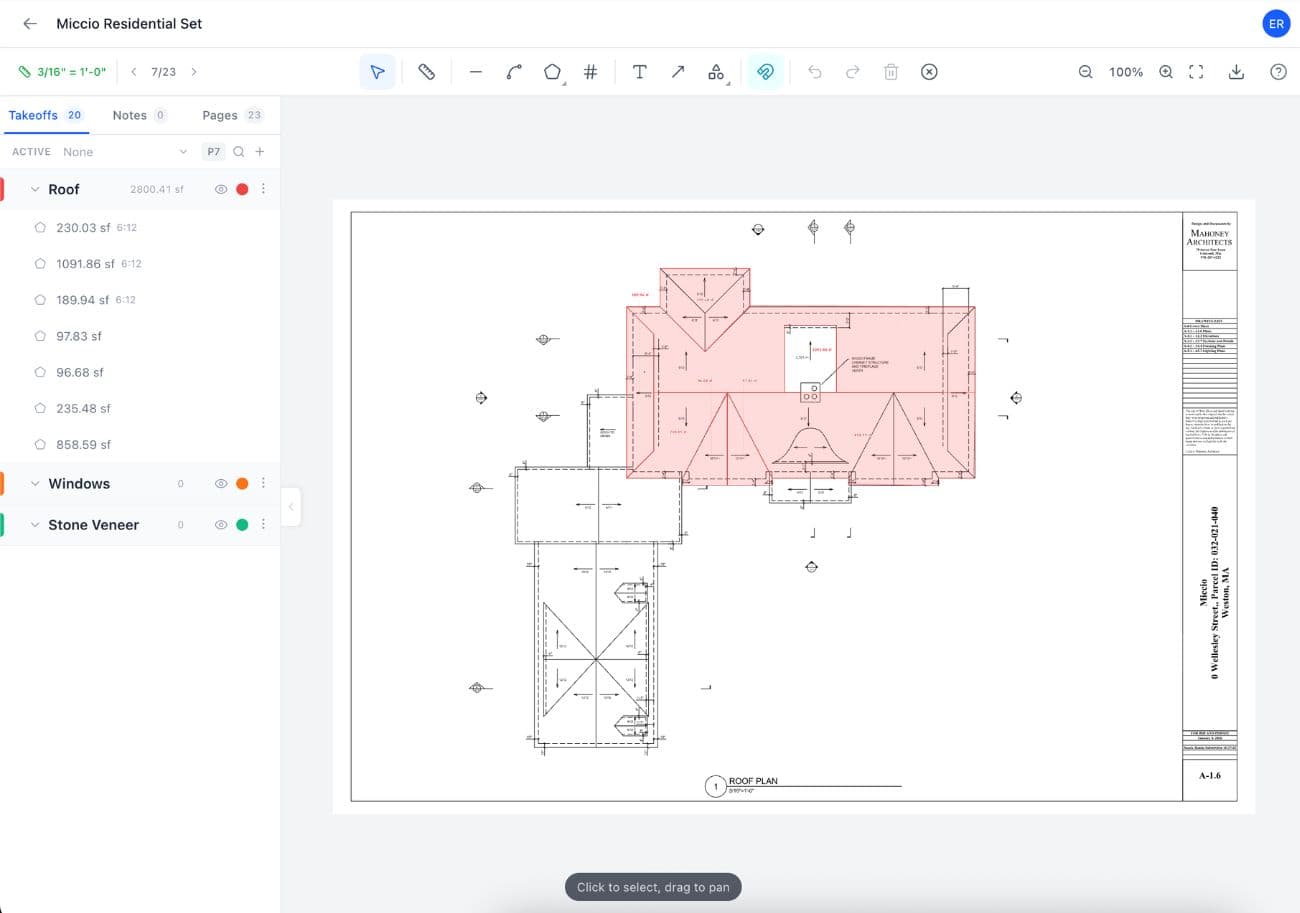
Easy Takeoffs is a simple, low-cost construction takeoff tool that runs in any browser. There is nothing to install and no Windows dependency. It runs on Mac, Windows, ChromeOS, Linux, and iPad with Apple Pencil, which makes it a direct PlanSwift alternative for Mac users. Your projects auto-save to the cloud and are accessible from any device. The tool includes linear, polyline, polygon, rectangle, circle, freehand, count, and angle measurements with true curved segments, automatic scale detection with a one-run option that sets every page, snap to drawing geometry, color-coded groups with sub-groups, and live group totals across square feet, linear feet, count, perimeter, volume, and wall area. Search every sheet for text (scanned pages included), or box one symbol and review or uncheck confirmed results before adding the checked set as counts. Apply any of the 44 built-in material templates to turn measurements into drywall sheets, paint gallons, concrete cubic yards, or any custom formula you write. Browse the community library for trade-specific templates other contractors have shared, or build your own with the formula editor. Export to annotated PDF and CSV with material totals included.
What PlanSwift Users Run Into
The most common reasons contractors look for a PlanSwift alternative, drawn from verified reviews on G2, Capterra, Trustpilot, and Reddit.
Current purchases use annual subscriptions
PlanSwift's pricing page lists Essential at $2,000 per year for one seat and Core at $3,000, which adds Auto Takeoff. Its checkout still lists the Professional Subscription at $2,000 per year. ConstructConnect's current support page also confirms that some existing customers remain on perpetual licenses with annual maintenance or without maintenance, so it would be inaccurate to say every perpetual license was revoked. ConstructConnect's public Takeoff Boost entitlement guidance conflicts: its installer page labels the update subscription-only, while its April 2026 guide and June 2026 release notes list some Advanced or Premium Maintenance plans as eligible. Existing customers should verify entitlement in the Customer Portal.
Desktop performance depends on the setup
ConstructConnect recommends 64-bit Windows 11 Pro or Enterprise, at least 16GB of memory, and SSD or NVMe storage for PlanSwift. Its own performance guidance says project size, source-file quality, software version, plug-ins, and storage configuration can all affect large-job performance. That is a workstation and file-management workflow, while Easy Takeoffs moves the application and project storage into the browser and cloud.
A broader Windows desktop interface
PlanSwift combines measurement, assemblies, cost data, plug-ins, reports, and Excel integration in one Windows desktop application. That breadth is valuable when the whole estimating workflow lives in PlanSwift, but it also gives a new user more concepts and controls to learn than a focused takeoff product. Easy Takeoffs intentionally covers a narrower measurement and material-quantity workflow.
Windows desktop, without a native browser or mobile app
PlanSwift has no native macOS, iPad, mobile, or browser application. A Mac user can run it inside a supported version of Windows through a virtual machine such as Parallels, although ConstructConnect tests on native Windows machines and does not guarantee a specific Mac setup. A single-seat license can move between computers, and one user can keep jobs in a fully synced OneDrive folder to work across computers. PlanSwift warns that two users must never open the same job at once because doing so can corrupt it. Easy Takeoffs provides the browser and cross-device path directly.
Easy Takeoffs vs PlanSwift
A side-by-side look at what each tool offers. We include features where PlanSwift has the advantage, because an honest comparison builds more trust than a cherry-picked one.
No credit card, no install, no enterprise contract.
Far Cheaper than $2,000 per Seat per Year
PlanSwift's September 2026 pricing page lists Essential at $2,000 per year for one seat ($1,500 per seat for two or more) and Core at $3,000 for one seat ($2,500 per seat for two or more). Essential includes Auto Count, Auto Scale, and Auto Bookmark; Core adds Auto Takeoff. The checkout still lists a Professional Subscription at $2,000 per year. ConstructConnect also documents that some existing customers still use perpetual licenses with annual maintenance or without maintenance. Its public pages conflict on Takeoff Boost eligibility for maintenance plans, so existing customers should verify their entitlement in the Customer Portal. Trade-specific plug-ins for electrical, plumbing, HVAC, and other trades are sold separately. Easy Takeoffs is $39 a month or $399 a year per individual account. Compare the published subscription prices for a new purchase, then account for any legacy PlanSwift license your company already owns and the estimating or automation capabilities your workflow requires.
Easy Takeoffs
Cheapestin the category
- ✓$39/mo or $399/yr
- ✓Simple, easy to learn in minutes
- ✓Runs on Mac, Windows, iPad
- ✓Every measurement tool included
PlanSwift
$2,000/year
Per user, per year. Annual contract.
PlanSwift product and pricing facts checked against first-party pages in September 2026.Sources: PlanSwift pricing, PlanSwift checkout, PlanSwift features, PlanSwift subscription and legacy-license installer guidance, PlanSwift Takeoff Boost entitlement guide, PlanSwift release notes and maintenance eligibility, PlanSwift system and Mac requirements, PlanSwift single-seat license terms, PlanSwift OneDrive and multi-computer storage guidance, PlanSwift concurrent job access warning
The cheapest and simplest way to do construction takeoffs. Start your takeoff →
What PlanSwift Does Better
PlanSwift has a mature built-in estimating system that goes well beyond measurement. Its drag-and-drop assemblies let you attach materials, labor rates, and cost databases directly to takeoff measurements and generate a complete bid from within the tool. Essential includes Auto Count, Auto Scale, and Auto Bookmark; Core adds Auto Takeoff, giving estimators an automated first pass to review and adjust. For trades like electrical and plumbing, PlanSwift offers pre-built trade plug-ins with fixture libraries and pricing data that speed up the estimating workflow. If your business requires automated takeoffs and complete cost estimates inside one Windows application, PlanSwift offers genuine depth that Easy Takeoffs does not yet match. Easy Takeoffs focuses on a simpler measurement and material-quantity workflow today, with estimating features on the roadmap.
Who Easy Takeoffs Is Built For
Easy Takeoffs is built for contractors and estimators who want a focused takeoff workflow for $39 a month instead of a PlanSwift subscription that starts at $2,000 for Essential. You want software that opens in your browser, auto-saves to the cloud, and lets you reach the same project from a laptop, tablet, or phone. You do not need PlanSwift's deeper cost estimating or plug-in system. If you or anyone on your team owns a Mac, you would rather open Safari or Chrome than maintain a Windows virtual machine and customer-managed job storage.
How to Switch from PlanSwift
Easy Takeoffs is cloud-based with nothing to download or install. Upload the same source PDFs you measure in PlanSwift, confirm the detected scale or calibrate it manually, and start measuring. Easy Takeoffs does not import PlanSwift's proprietary measurements, assemblies, or cost databases, so keep exports of completed work and rebuild the setup you still use. Other vendors may offer migration services, so verify that capability directly when editable historical measurements are a deciding factor. Mac users can run the Easy Takeoffs workflow in a browser without Parallels, Boot Camp, or a separate Windows computer.
PlanSwift vs Easy Takeoffs FAQ
Start Your Construction Takeoff Today
Upload your plans, measure your quantities, and export the results. Try the full software for 14 days, then choose $39 a month or $399 a year.