
Autodesk Forma Takeoff is the new name for Autodesk Takeoff. In March 2026, Autodesk Construction Cloud became Autodesk Forma, and its products were renamed with it: Autodesk Docs is now Forma Data Management, Autodesk Takeoff is Forma Takeoff, and Autodesk Estimate is Forma Estimate. The product Autodesk previously called Forma, for early site planning, is now Forma Site Design, so a search for Forma alternatives can turn up software for a different job. Autodesk's announcement lists the changes.
The right replacement depends on which parts of Forma Takeoff you rely on. If you mostly measure PDF plans and price the work in a spreadsheet, a takeoff tool built for PDFs can cover that for less. If model quantities or Autodesk's shared documents are central to your bids, the field narrows, and keeping Forma Takeoff can be the sensible choice; this guide says where.
The Forma Takeoff alternative to choose depends on where your quantities come from. For PDF plans priced in a spreadsheet, compare Easy Takeoffs at $399 a year, Bluebeam Complete at $440, and ConstructConnect Takeoff at $1,200 to $2,200. PlanSwift and STACK Pro add material and labor estimating to the takeoff, and Togal.AI is built around AI that detects and measures spaces on the plans. When quantities come from building models, compare RIB CostX and Procore Estimating with Procore BIM, both sold by quote. Forma Takeoff itself is $1,290 per user a year, or $160 a month.
What Forma Takeoff Includes
Forma Takeoff costs $1,290 per user a year, or $160 a month, on Autodesk's US store, with a 30-day trial. Each subscription includes Forma Data Management, where the project's drawings and models are kept. Plans for unlimited users, and the Forma for Preconstruction bundle that adds Forma Estimate, BuildingConnected Pro, and other preconstruction products, are priced by Autodesk's sales team.
In the product, you measure lengths, areas, and counts on 2D sheets, with custom formulas for more complex quantities, and you take off a 3D model by selecting its objects and adding them to a takeoff type. Quantities from sheets and models roll up into one inventory that you can group by classification, location, or document, and adding unit costs gives you a rough budget that updates as the quantities change. Autodesk's AI features include Automated Symbol Detection, which finds and counts matches of a symbol you trace on a sheet, and Autodesk Assistant, which answers questions about the project's published specifications. You set each sheet's scale by picking it from a list or calibrating against a known dimension, and you can apply one scale to several sheets at once.
Forma runs in Chrome, Firefox, Safari, or Edge, and Autodesk's system requirements list no operating system requirement, so it already works on a Mac.
Decide What You Need to Replace
Start with a recent bid and follow its quantities into the estimate. That tells you more than a feature list.
If you measure PDFs and price in a spreadsheet, focus on the takeoff and the export. Can you keep floors, materials, and alternates separate? Can the person pricing the job trace each quantity back to the drawing? Easy Takeoffs, Bluebeam, and ConstructConnect Takeoff are the options to compare for this work.
If you want to price the bid in the takeoff software, look at PlanSwift, STACK Pro, and Procore Estimating, which apply material and labor costs in the same tool, and at CostX, which links quantities to estimating workbooks and rate libraries. Assemblies alone don't settle it: Easy Takeoffs has assemblies too, but they calculate material quantities, not prices. Autodesk's own route is Forma Estimate, which it sells only in the Forma for Preconstruction bundle.
If the building model supplies part of your quantities, compare CostX and Procore Estimating with Procore BIM. Ask for a demonstration with your own model, check which objects feed each total, and see what happens to objects with missing or wrong information. A PDF tool can cover the scope you measure on drawings, but it doesn't take quantities from model objects.
If drawings reach you through Autodesk, for example from a general contractor who shares the project in Forma Data Management, confirm how you'll keep receiving revised sheets after your own subscription ends, and that you can download them as PDFs for the new tool.
If several estimators share projects, compare how each product charges for a team. Forma Takeoff, Bluebeam, STACK, and Togal.AI charge per user; PlanSwift and ConstructConnect Takeoff Professional charge less for each additional seat; CostX has standalone and network licenses; Procore includes unlimited users; and Easy Takeoffs is one user per account for now.
If you work on a Mac, note that Forma Takeoff runs in a browser, while Bluebeam Revu, PlanSwift, and CostX are Windows programs that need Windows in a virtual machine on a Mac. The other options run in a browser.
If you pay month to month, check the term as well as the price. Forma Takeoff and Easy Takeoffs both have monthly plans, at $160 and $39. STACK's monthly payments still run on a 12-month term, and Bluebeam, ConstructConnect Takeoff, PlanSwift, and Togal.AI are billed annually.
Forma Takeoff Alternatives Side by Side
These are published prices for one user, in US dollars before tax, checked on October 30, 2026. Forma Takeoff is in the last row for comparison.
| Software | Price for one user | Runs on | Built around |
|---|---|---|---|
| Easy Takeoffs | $399 a year, or $39 a month | Browser on Windows, Mac, iPad, and Chromebook | Takeoff from PDF plans, with assemblies for material quantities |
| Bluebeam | Core $330 or Complete $440 a year | Windows for Revu; web and mobile apps | PDF markup and review with measurement; Quantity Link to Excel on Complete |
| ConstructConnect Takeoff | Starter $1,200 or Professional $2,200 a year | Browser | Takeoff with AI sheet naming and scaling; Auto Takeoff on Professional |
| PlanSwift | Essential $2,000 or Core $3,000 a year | Windows | Takeoff with material and labor estimating and a live Excel link |
| STACK | Premium $3,588 or Pro $4,188 a year | Browser | Takeoff with AI tools; estimating and proposals on Pro |
| Togal.AI | Growth $3,588 a year | Browser | AI that detects, measures, and counts spaces on the plans |
| RIB CostX | By quote | Windows; CostX Cloud hosted by RIB | Takeoff from 2D drawings and BIM models, linked to estimating workbooks |
| Procore Estimating | By quote, as an annual fee | Browser | Takeoff, estimates, and proposals in Procore; 3D takeoff with Procore BIM |
| Autodesk Forma Takeoff (for comparison) | $1,290 a year, or $160 a month | Browser | 2D and 3D takeoff with Autodesk's document management |
The Options, One by One
Easy Takeoffs
$39 a month or $399 a year, one plan with every feature. The 14-day trial needs no credit card.
Easy Takeoffs is takeoff software for PDF plans that runs in a browser. When you upload a plan set, AI names each sheet from its title block, and detected scales are offered as suggestions you confirm. Symbol search finds repeated symbols from one example; you review the matches and add the ones you keep as counts. Text search covers the whole set, scanned sheets included.
Built-in and custom assemblies turn measurements into material quantities. A tile flooring assembly turns measured floor area into tile, thinset, grout, backer board, and the rest, each with its own waste allowance, and a custom assembly holds your own formulas for a scope you bid often. Quantities update when the measurements change.
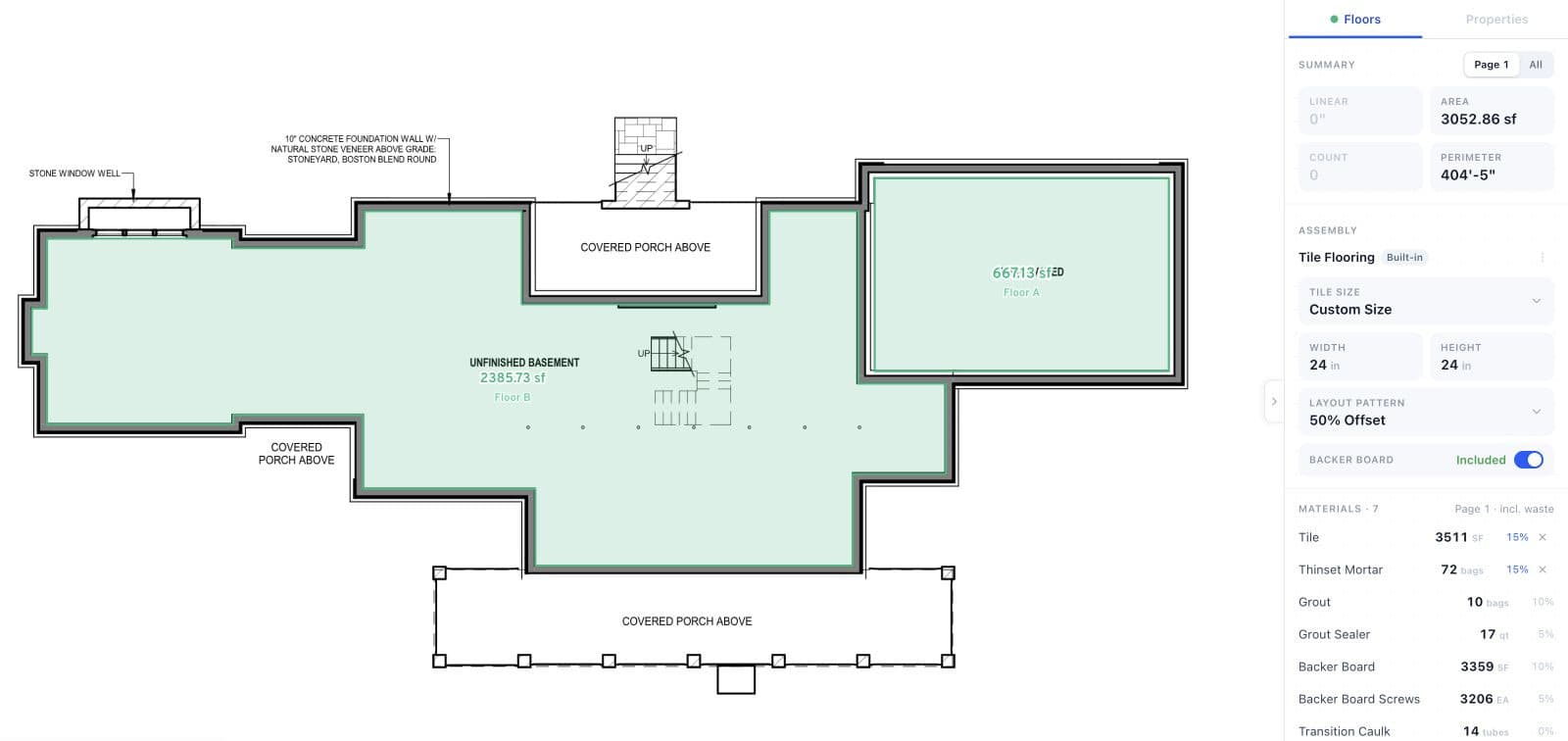
Two floor areas in this Learning Center example total 3,052.86 sq ft. The Tile Flooring assembly turns them into 3,511 sq ft of tile at 15% waste, with thinset, grout, backer board, and other materials at their own waste allowances.
Open full-size screenshot (opens in a new tab)Measurement groups keep quantities separate by floor, material, or bid package. When an addendum arrives, you upload the revised set as a new version of the plan, compare old and new sheets, and make the new version current; measurements on sheets that changed are marked for review. Exports are an annotated PDF, a CSV, or quantities written into your own Excel template. Material prices, labor, and the bid total stay in your spreadsheet or estimating system.
Runs on: a browser on Windows, Mac, iPad, and Chromebook, with nothing to install.
Choose it if you bid from PDF plans and price in a spreadsheet, and Forma's model takeoff and document management are more than your work needs.
Not the right fit if your quantities come from 3D models, your team works together in shared Autodesk projects, or you want pricing and proposals in the takeoff software. Easy Takeoffs reads PDF drawings only, each account is one user for now, and it doesn't import Forma takeoff data.
Bluebeam
Basics is $260, Core $330, Complete $440, and Max $590 per user a year, billed annually; Max is an introductory price (Bluebeam pricing).
Bluebeam Revu is PDF software for markup, review, and document collaboration, with measurement built in. Basics measures lengths and areas, and Core adds perimeters, counts, angles, and volume. For an estimator who prices in Excel, Complete is the plan to compare: its Quantity Link sends measurement totals from a local PDF into Excel as they change, with filters so each category of markup feeds its own cells. Complete also adds Dynamic Fill, which fills a region of the drawing to measure it. Every plan includes Bluebeam on the web and mobile, with a smaller set of measurement tools than Revu.
Runs on: Windows for Revu, plus web and mobile apps.
Choose it if your team already marks up and reviews drawings in Bluebeam, or your estimate lives in an Excel workbook you want linked to the takeoff.
Not the right fit if you want the full desktop toolset on a Mac without running Windows, or monthly billing; every plan is billed annually.
ConstructConnect Takeoff
Starter is $1,200 a year for a single seat; Professional is $2,200 a year for the first seat and $1,700 for each additional seat. Both are annual contracts paid upfront, and ConstructConnect's pricing page says subscriptions can't be canceled or refunded during the term. A trial is arranged through sales.
ConstructConnect, the company behind PlanSwift and On-Screen Takeoff, released this browser takeoff in September 2026. As plans load, Auto Name names the sheets and Auto Scale sets their scale. Starter limits each project to 25 plans. Professional removes the limit, lets you add collaborators who can view and edit, and adds Auto Takeoff, which measures walls, rooms, ceilings, doors, windows, plumbing fixtures, and concrete footings, foundations, and slabs on architectural drawings for you to review and adjust. ConstructConnect's October updates extended Auto Takeoff to more trades and added estimating in beta. Both plans export to CSV.
Runs on: a browser on a computer, tablet, or phone, including Mac, iPad, and Chromebook.
Choose it if you do interior finish or concrete work from architectural drawings and want an automated first pass in a browser, on an annual contract.
Not the right fit if you want month to month billing.
PlanSwift
Essential is $2,000 a year and Core $3,000 a year, each for one seat, with discounted pricing for additional seats. Both are annual plans on PlanSwift's pricing page, and the 14-day trial needs no credit card.
PlanSwift is a Windows program for takeoff and estimating. Material and labor assemblies apply as you measure, so costs update with the takeoff, and its estimating workspace keeps folders, items, assemblies, and the cost of each line item in one bid view. A live Excel link updates connected cells as takeoff values change. Essential includes Auto Count, Auto Scale, and Auto Bookmark; Core adds Auto Takeoff, which builds a first pass of areas, lengths, and counts.
Runs on: Windows, with Windows 11 Pro or Enterprise recommended. On a Mac, it needs Windows in a virtual machine, or Boot Camp on an Intel Mac.
Choose it if you want material and labor pricing inside the takeoff program, or you already keep assemblies and labor units in PlanSwift.
Not the right fit if you work on a Mac or iPad, or you only need quantities for a spreadsheet you already use.
STACK
Premium is $3,588 and Pro $4,188 per user a year, billed annually. Paying monthly instead costs $349 or $399 a month, and every plan runs on a 12-month term (STACK pricing). A free plan, after seven days of Pro, allows one active project a month, 300 plan pages, and 50 measurements per project.
STACK runs in a browser. Premium includes the full takeoff toolset, a prebuilt item and assembly library, overlay to compare drawing versions, automatic plan naming, symbol search, AI Takeoff, and STACK IQ, an AI chat about project details. Pro adds estimating of labor and materials in a worksheet with items and assemblies, STACK for Excel, a regional cost library, and proposals.
Runs on: a browser on Windows or Mac, with touch input on compatible iPads.
Choose it if you want takeoff, estimating, and proposals in one browser system, and the price per user fits your team.
Not the right fit if you price bids elsewhere and only need the takeoff, or you want monthly billing you can stop at any time.
Togal.AI
Growth is $299 per user a month, billed yearly, which is $3,588 a year; Business, for teams of four or more, is priced by quote (Togal.AI pricing). Signing up starts with booking a demo, and to cancel you contact Togal before the next renewal.
Togal.AI is cloud takeoff built around AI. The Togal button detects, measures, counts, and labels spaces on a plan; AI search finds matching images, text, or patterns from a box you draw; and a naming tool names your documents automatically. Growth includes unlimited automated takeoffs, chat prompts, and image and symbol searches, with collaboration inside your account and with people outside it. It accepts PDF, JPEG, PNG, and TIFF files.
Runs on: a web browser.
Choose it if you want AI to take the first pass at whole plans, and you'd rather review and correct than draw.
Not the right fit if you want monthly billing, or to sign up and start without a demo.
RIB CostX
Priced by quote. RIB doesn't publish CostX prices; its pricing page is a request form. Licenses are either standalone, for one user on one PC, or network licenses that a set number of users share at the same time.
RIB CostX handles takeoff, estimating, and reporting in one program. It takes off from 2D drawings, including PDFs, CAD files, and scans, and from BIM models, where Model Maps control how quantities are extracted. Its estimating workbooks link to the drawings and to rate libraries, so a changed dimension flows into the estimate, and a revision mode compares drawing versions and highlights what changed.
Runs on: 64-bit Windows, according to RIB's system requirements; on a Mac, in Windows through a virtual machine, or Boot Camp on an Intel Mac. RIB also sells CostX Cloud, a subscription it hosts and manages in Microsoft Azure.
Choose it if your estimates draw on both drawings and models, and you want quantities feeding detailed cost plans with a record of each revision.
Not the right fit if you want a published price and a quick start, or you work on a Mac without Windows.
Procore Estimating
Priced by quote. Procore charges an upfront annual fee for each product, based on your annual construction volume, with unlimited users (Procore pricing).
Procore Estimating handles takeoff, estimates, and proposals inside Procore's construction platform. Takeoff draws on a database of parts, assemblies, equipment, and services, with automatic counting and plan overlay, and Procore says its AI detects floor plan areas and counts repeated symbols. Its 3D takeoff maps objects in Revit models to items and assemblies in your cost catalog, as counts, lengths, areas, and volumes. That requires the Procore BIM product, with the Revit files in the project's Documents tool.
Runs on: a browser on Windows or Mac, with iOS and Android apps.
Choose it if your company runs projects in Procore, or plans to, and you want estimates to carry into bids, contracts, and project financials, with model takeoff through Procore BIM.
Not the right fit if you only need to replace one estimator's takeoff seat; Procore is bought as a platform, by quote.
When Keeping Forma Takeoff Makes Sense
Forma Takeoff keeps drawing measurements and model quantities in one inventory, next to the documents your projects may already share in Autodesk. If you use both, a PDF tool replaces only half of that, and the model takeoff options in this guide are sold by quote and are bigger changes than switching one subscription.
The rename isn't a reason to move. Autodesk says projects, files, members, and settings stayed where they were, with no changes to logins, integrations, seat counts, or contracts. Moving makes sense when it fixes a specific problem, such as paying for model takeoff and document management you don't use, or retyping quantities into an estimate on every bid.
If detailed pricing is what's missing, price Autodesk's route as well. Forma Estimate connects materials, labor, and other costs to 2D and 3D takeoff quantities and updates as the takeoff changes, and Autodesk sells it only in the Forma for Preconstruction bundle. Compare that quote with an alternative, including the work of rebuilding your takeoff types and classifications somewhere new.
Check the Numbers Before Switching
Use a job you have already bid, with an addendum and the estimate you actually priced. Check that the new software produces the same quantities with the same meaning before you judge how quick it is; a fast takeoff that changes what a quantity means creates more work later.
Here is a simple flooring example you can reproduce in a spreadsheet or any takeoff program. The inputs are illustrative, not a customer job:
- Level 1 has 1,200 sq ft of tile and Level 2 has 1,800 sq ft, both net areas after deductions.
- The waste allowance is 10% for this example; your real allowance depends on the material and layout.
- An optional room adds 200 sq ft, but it belongs to an alternate and stays out of the base bid.
- An addendum changes 150 sq ft on Level 2 from tile to another finish.
| Quantity | Original bid | After addendum |
|---|---|---|
| Level 1 measured tile area | 1,200 sq ft | 1,200 sq ft |
| Level 2 measured tile area | 1,800 sq ft | 1,650 sq ft |
| Base measured tile area | 3,000 sq ft | 2,850 sq ft |
| Base tile quantity with 10% waste | 3,300 sq ft | 3,135 sq ft |
| Separate alternate, including 10% waste | 220 sq ft | 220 sq ft |
The revised base tile quantity is 2,850 × 1.10 = 3,135 sq ft. The alternate stays separate, and the tile removed by the addendum is gone from the base. Rounding up to full cartons is a further step, based on the coverage of the product you select.
This catches the usual comparison mistakes. A 3,000 sq ft measured total and a 3,300 sq ft material total can both be correct, because only one includes waste; adding waste again in Excel would overstate the order. Folding the alternate into the base bid would price scope that hasn't been accepted. And a matching grand total proves little if two materials or two levels have been combined.
In Easy Takeoffs, the two levels and the alternate would sit in separate groups, with the waste applied in the assembly, so the measured area and the order quantity stay distinct. Whatever you choose, check that the exported rows keep enough detail to price the revised job.
Keep a Record of Your Forma Takeoff
Before moving an active job, save the source drawings and a record of each quantity's unit, classification, location, and the drawing revision it came from, along with the estimate that used them.
Forma's inventory export produces an Excel workbook with two sheets: a summary that follows your current grouping, and the inventory details. Column settings don't change it, and each export is limited to 65,000 takeoff outputs. For chosen fields, filters, and a PDF version, use a takeoff inventory report. To keep the marked drawings, export the sheets to PDF, up to 200 sheets at a time, each with a legend of its takeoff in the margin.
A quantity spreadsheet is a record, not a project. It doesn't recreate editable measurements, model selections, or takeoff types in another program, so ask any vendor that offers an import to show it with a copy of your own work. Easy Takeoffs doesn't import Forma data: you start from the PDF drawings and check the new takeoff against the quantities you saved.
Try your next PDF takeoff in Easy Takeoffs
Take a plan set you've already bid and compare the quantities with your Forma numbers. You can use every Pro feature for 14 days, with no credit card. After the trial, Pro is $39 a month or $399 a year.
For a wider shortlist, see our takeoff software buying guide, and for what takeoff software costs across plans and billing terms, our guide to cheap takeoff software. If AI features weigh in your decision, the AI takeoff software guide compares what each product's AI does. For head to head comparisons, see Easy Takeoffs against Bluebeam, PlanSwift, STACK, and Procore.
How We Researched This
Prices, plans, and features for the other products come from each vendor's own website and documentation, checked on October 30, 2026: Autodesk's Forma Takeoff store, product pages, help articles, and rename announcement; Bluebeam's pricing and Quantity Link pages; ConstructConnect's pricing, product, and launch pages; PlanSwift's pricing and features pages; STACK's pricing and licensing pages; Togal.AI's pricing and features pages; RIB's CostX product page and system requirements; and Procore's estimating, pricing, and support pages. Easy Takeoffs details come from the product itself. The flooring example is arithmetic on illustrative numbers. Prices change, so confirm the plan and price with the vendor before you buy.
Frequently Asked Questions
Is Forma Takeoff the same as Autodesk Takeoff?
Yes. Autodesk renamed Autodesk Takeoff to Forma Takeoff in March 2026, when Autodesk Construction Cloud became Autodesk Forma, and it says projects, files, and settings stayed where they were. The product previously called Forma is now Forma Site Design, a site planning tool, so a search for Forma alternatives can return software for a different job than construction takeoff.
How much does Forma Takeoff cost?
On Autodesk's US store in October 2026, Forma Takeoff is $1,290 per user a year, or $160 a month, and the subscription includes Forma Data Management. The $108 a month shown on the store is the annual price spread over twelve months. There is a 30-day trial. Plans for unlimited users and the Forma for Preconstruction bundle, which adds Forma Estimate, are priced by Autodesk's sales team.
Which Forma Takeoff alternatives cost less?
For takeoff from PDF drawings, several do. Among the paid plans in this guide, Bluebeam's start lowest: Basics at $260 a year measures lengths and areas, Core at $330 adds counts, and Complete at $440 adds Quantity Link to Excel. Easy Takeoffs is $399 a year or $39 a month, and ConstructConnect Takeoff Starter is $1,200 a year. These cover drawing takeoff; if you rely on Forma's model quantities, compare CostX or Procore Estimating instead.
What are the risks of replacing Forma Takeoff with a cheaper alternative?
The main risk is losing something you relied on without noticing. Check four things before you switch: whether any of your quantities come from 3D models, which a PDF tool won't replace; whether you receive drawings through shared Autodesk projects; whether your takeoff types, classifications, and formulas can be rebuilt in the new tool; and whether its export keeps quantities separate by level, material, and alternate. Then run one finished job through the new software and compare its totals with your Forma inventory before you cancel.
Which Forma Takeoff alternatives work on a Mac?
Forma Takeoff itself runs in a browser, including Safari on a Mac. Easy Takeoffs, ConstructConnect Takeoff, STACK, Togal.AI, and Procore Estimating run in a browser too, and Bluebeam's web app measures in a browser with fewer tools than Revu. Bluebeam Revu, PlanSwift, and CostX are Windows programs, so on a Mac they need Windows in a virtual machine. Our Mac takeoff software guide compares the options and what each costs on a Mac.
Is there a free alternative to Forma Takeoff?
STACK has a free plan that starts with seven days of Pro, then allows one active project a month, up to 300 plan pages, and 50 measurements per project. The other tools here are paid, and several have trials: Easy Takeoffs for 14 days with no credit card, PlanSwift for 14 days, ConstructConnect Takeoff through its sales team, and Forma Takeoff itself for 30 days. Check a free plan's limits against a complete bid before you rely on it.
Does Forma Takeoff have AI features?
Yes. Autodesk lists Automated Symbol Detection, which finds and counts matches of a symbol you trace on a sheet; Autodesk Assistant, which answers questions about published specifications; a Specifications tool that splits large spec books into searchable sections; and Construction IQ, which looks through project data for potential issues. Our AI takeoff software guide compares what each product's AI does.
Which Forma Takeoff alternatives support 3D model takeoff?
RIB CostX takes off from BIM models as well as 2D drawings, with Model Maps to control how quantities are extracted; it runs on Windows and is sold by quote. Procore Estimating maps objects in Revit models to items and assemblies in your cost catalog, which requires the Procore BIM product. Test the model formats and the breakdown of quantities you use before you buy. Easy Takeoffs works from PDF drawings only.