
Takeoff software measures construction plans, counts what's on them, and keeps the quantities behind an estimate. Nearly every product measures lengths, areas, and counts. The differences that decide a purchase sit around the measuring: what happens to the quantities afterward, the computer the software runs on, how much plan setup it handles for you, and how the price is billed.
This guide compares established takeoff products on those points, from PDF software with measurement tools to takeoff programs with estimating built in. Prices come from each vendor's own site, checked in October 2026.
The right takeoff software depends on where your quantities go after you measure. If you price jobs in your own spreadsheet or estimating system, a dedicated takeoff tool is enough. Among the tools here, those cost from $399 a year for Easy Takeoffs to $3,588 per user a year for STACK Premium and Togal.AI Growth. Takeoff and estimating software, which adds material and labor pricing, costs $1,699 to $6,110 a year for the products compared here, such as Square Takeoff, PlanSwift, Buildxact, and STACK Pro. Bluebeam's PDF software also measures, from $260 a year. Then check that the software runs on your computer, bills the way you want to pay, and automates the steps you repeat on every job.
What Decides the Choice
Where the quantities go. Takeoff software produces quantities. Estimating software prices them, adding material costs, labor, overhead, and profit to reach a bid. Some products stop at quantities, some include estimating, and some sit inside a system that also runs the job. Assemblies fall in between: they turn one measurement into several material quantities, such as wall area into drywall boards, compound, tape, and screws, without pricing them. If you already price work in a spreadsheet you trust, estimating features you won't use only raise the price. If you build every estimate by hand, software that carries quantities into a priced estimate and proposal can replace that work.
The computer you work on. PlanSwift, On-Screen Takeoff, and Bluebeam Revu are Windows programs. On a Mac they need Windows running in a virtual machine, which adds cost and setup; our guide to takeoff software for Mac covers that choice. Browser-based tools such as Easy Takeoffs, STACK, Togal.AI, ConstructConnect Takeoff, Square Takeoff, and Buildxact run on any operating system. If you plan to measure on a tablet, confirm that the tools you need work there, not just plan viewing.
How the price is billed. Compare the same unit: per user or per company, monthly or annual, and the length of the commitment. Bluebeam, PlanSwift, and Togal.AI bill annually. STACK's monthly payments still sit on a 12-month term, and ConstructConnect Takeoff requires an annual contract paid upfront. Easy Takeoffs, Square Takeoff, and Buildxact have monthly plans. Our guide to cheap takeoff software works through the cost per bid and when monthly billing costs less than an annual discount.
How much plan setup and counting is automated. Takeoff software automates three different jobs. Plan setup names sheets from their title blocks and reads the drawing scale, work you otherwise repeat by hand on every new plan set. Symbol search and auto count find repeated fixtures, devices, or doors, so you review the matches instead of clicking each one. Automated takeoff draws a first pass of rooms, walls, or counts that you check and correct; STACK and Buildxact say theirs work best on, or only on, floor plans. Our AI takeoff software guide compares those features product by product.
Who else needs access. Price every seat you need. Buildxact, Buildertrend, and Procore include unlimited users, and STACK includes unlimited viewer seats. PlanSwift and ConstructConnect Takeoff Professional charge less for each additional seat, while ConstructConnect Takeoff Starter allows one. An Easy Takeoffs account is one user for now; a read-only link lets a client or teammate view a plan without an account.
How long it takes to learn. Basic measuring comes quickly if you already read plans and understand scale. The longer part is setting up the work you repeat, such as assemblies, condition or group names, and export layouts, so ask what training comes with the plan you'd buy.
The trade you work in. Specialty scopes can narrow the list. For doors, frames, and hardware, our Division 8 software guide explains which jobs need takeoff tools and which need specialist detailing software. For toilet partitions, accessories, and other specialties, the Division 10 software guide does the same, with a six-room accessory example you can use in a trial. Our trade pages cover what each trade needs from a takeoff.
Takeoff Software Side by Side
These are published US prices before tax, checked on each vendor's site on October 30, 2026. Each row shows the plan that covers a typical takeoff, with the vendor's other plans beneath the price. Features differ by plan, so the last two columns name the plan where it matters.
| Software | Plan and price | Beyond measuring | Automation |
|---|---|---|---|
| Easy TakeoffsBrowser on Windows, Mac, iPad, and Chromebook | Pro: $399 a yearOne user; or $39 a month | Built-in and custom assemblies for material quantities; PDF, CSV, and Excel template exports | Sheet naming, scale suggestions, symbol search, Dynamic Fill on drawn PDFs |
| Bluebeam RevuWindows; web and mobile apps with fewer tools | Core: $330 a yearPer user; Basics $260, Complete $440, Max $590 | PDF markup, document review, and drawing comparison; Quantity Link to Excel in Complete | Dynamic Fill in Complete; AI drawing review in Max |
| ConstructConnect TakeoffBrowser on any computer, tablet, or phone | Starter: $1,200 a yearOne seat only; Professional $2,200 for the first seat | Quantities to CSV and plans to PDF; estimating in beta since October | Sheet naming and scaling; Auto Takeoff in Professional |
| Square TakeoffOnline on a Mac or PC | $1,699 a yearEvery feature; also $599 a quarter or $249 a month | Material, labor, and equipment estimates; parts catalog; roof tools | No automated takeoff listed |
| PlanSwiftWindows | Essential: $2,000 a yearFirst seat; more seats $1,500; Core $3,000 | Cost estimating with material and labor assemblies; live Excel link | Auto Count, Auto Scale, Auto Bookmark; Auto Takeoff in Core |
| BuildxactBrowser (Chrome, Firefox, or Safari) | Foundation: $2,030 a yearWhole company, unlimited users; or $199 a month | Estimates, quote letters, and purchase orders; job management in Pro | Assembly Assistant; Takeoff Assistant for floor plans is a Pro add-on |
| STACKBrowser | Premium: $3,588 a yearPer user, 12-month term; Pro $4,188; limited free plan | Item and assembly library; Pro adds estimating, Excel integration, and proposals | Plan naming, symbol search, and AI Takeoffs |
| Togal.AIBrowser | Growth: $3,588 a yearPer user, billed yearly; Business by quote | Real-time collaboration; exports to Excel or estimating software | Automated room and area takeoff, drawing search, sheet naming |
| On-Screen TakeoffWindows | By quoteSubscription packages | Conditions and trade templates; connects to Quick Bid estimating | Takeoff Boost: automated measuring, page naming, Auto Count |
The Options, Tool by Tool
Easy Takeoffs
$39 a month or $399 a year, one plan. Easy Takeoffs Pro includes every feature, with a 14-day trial that needs no credit card.
When you upload a plan set, sheets are named from their title blocks and detected scales are offered as suggestions you confirm. You measure lengths, areas, and counts, with cutouts, wall heights, pitch, and depth for wall area, sloped surfaces, and volume. On drawn PDFs, Dynamic Fill measures a room when you click inside it. Symbol search finds repeated fixtures for you to review and count, text search covers the whole set with scanned sheets included, and a revised set can be compared with the original. A unit that repeats, such as an apartment or hotel room, can be measured once and placed as linked copies.
Built-in and custom assemblies turn measurements into material lists. The tile assembly below, for example, calculates tile, thinset, grout, backer board, and screws from floor area, with a waste allowance you can adjust for each material.
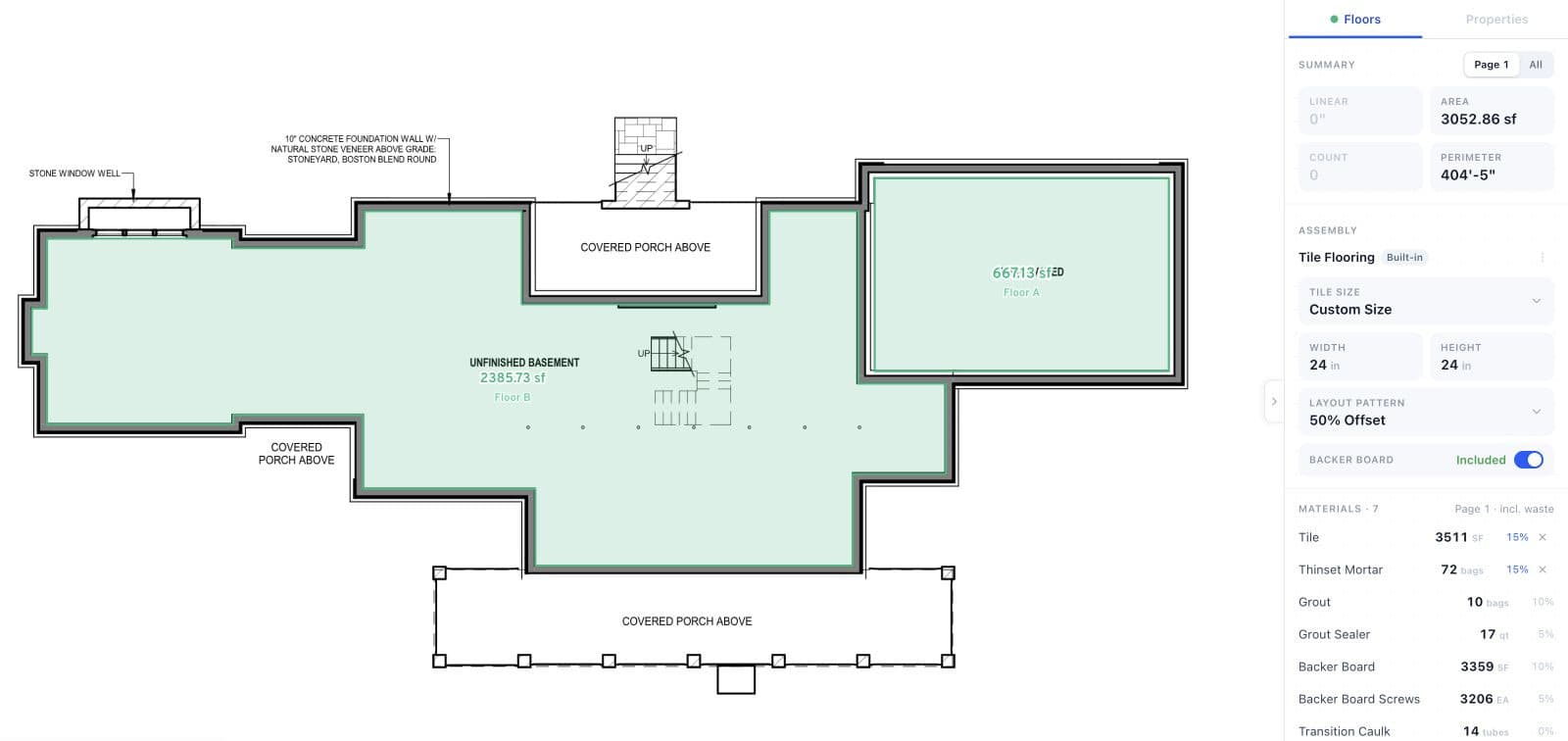
In this Learning Center example, 3,052.86 sq ft of measured floor area produces 3,511 sq ft of tile with 15% waste, rounded up to a whole square foot. The assembly also calculates mortar, grout, and other materials from the selected settings.
Open full-size screenshot (opens in a new tab)Exports are an annotated PDF, a CSV, or quantities placed into your own Excel estimating workbook with its formulas and formatting kept. Projects save to the cloud.
Runs on: a browser on Windows, Mac, iPad, and Chromebook, with nothing to install. It needs an internet connection.
Choose it if you measure PDF plans and price the work in a spreadsheet or another estimating system, and you want assemblies, plan setup, and counting tools in one affordable plan.
Not the right fit if you want material and labor pricing, proposals, or cost databases inside the takeoff software, or you want software that takes off a whole sheet on its own; Easy Takeoffs measures what you point it at and leaves pricing to your own system. It opens PDF plans only, not CAD files or 3D models. Each account is also one user for now, so a team that needs shared projects with access controls should look at team plans elsewhere.
Bluebeam Revu
Basics is $260 a year, Core $330, Complete $440, and Max $590, per user, billed annually. Max's price is introductory and holds through a renewal in 2027, according to Bluebeam's pricing page.
Revu is PDF software first, built for marking up and reviewing drawings, and its measurement tools grow by plan. Basics measures lengths and areas. Core adds counts, perimeter, angles, volume, and drawing comparison. Complete adds Dynamic Fill for enclosed areas, Quantity Link to send totals to Excel, and batch tools. Max adds AI drawing reviews and AI drawing comparisons.
Runs on: Windows for Revu, plus web and mobile apps with a smaller set of measurement tools.
Choose it if your company already reviews and marks up drawings in Bluebeam and its measurement tools cover your takeoffs, so one subscription does both jobs.
Not the right fit if you need the full desktop toolset on a Mac, or you'd rather pay month to month; Bluebeam's plans are annual.
ConstructConnect Takeoff
Starter is $1,200 a year for one seat; Professional is $2,200 for the first seat and $1,700 for each additional seat. Both require an annual contract paid upfront, according to ConstructConnect's pricing page. Trials are arranged through sales.
ConstructConnect, the company behind On-Screen Takeoff and PlanSwift, released this browser-based takeoff software in September 2026. Plans are named and scaled automatically as they load. Starter allows 25 plans per project. Professional removes that limit and adds Auto Takeoff, which detects and measures lengths, areas, and counts on architectural drawings for you to review. Quantities export to CSV, and takeoff and plans print to PDF. ConstructConnect describes it as built for interior trades such as drywall, acoustical ceilings, painting, and flooring, and its October release notes add estimating in beta, with material and labor costs on a finished takeoff.
Runs on: a browser on Windows, Mac, Chromebook, iPad, iPhone, or Android.
Choose it if you want an automated first pass of interior takeoff in a browser from an established takeoff vendor, and an annual contract suits you.
Not the right fit if you want monthly billing or the option to cancel early; subscriptions run for the full term, and ConstructConnect doesn't refund unused time.
Square Takeoff
$1,699 a year, $599 a quarter, or $249 month to month, with every feature in each plan. The month-to-month plan has no contract, according to Square Takeoff's pricing page, and there is a 14-day trial.
Square Takeoff, which Buildertrend acquired, measures plans online and turns the takeoff into estimates with material, labor, and equipment breakdowns from a parts catalog you can edit. It includes blueprint overlay for comparing versions, a roof tool set for hips, valleys, and sheathing, team access controls, bid tracking, and reports that export to Excel.
Runs on: online, on a Mac or PC, with project details available on mobile devices.
Choose it if you want takeoff and material, labor, and equipment estimates in one online tool, with month-to-month billing and no contract.
Not the right fit if you only need quantities for a spreadsheet you already use, or you want automated counting or measuring; its pricing page lists no symbol search or automated takeoff.
PlanSwift
Essential is $2,000 a year for the first seat, with additional seats at $1,500; Core is $3,000 for the first seat and $2,500 for each additional. Both are annual plans on PlanSwift's pricing page, and the 14-day trial includes everything in Core without a credit card.
PlanSwift is Windows desktop software that combines takeoff with estimating. Assemblies calculate materials and labor, custom formulas handle the math, and a live link updates Excel cells as quantities change. Essential includes Auto Count, Auto Scale, Auto Bookmark, and two hours of one-on-one training. Core adds Auto Takeoff, which builds a first pass of areas, lengths, and counts. It opens PDF, image, DWG, and DXF files.
Runs on: Windows 10 or 11. On a Mac it needs Windows in a virtual machine such as Parallels.
Choose it if you want takeoff and cost estimating in one Windows program, or you already have a library of PlanSwift assemblies and workbooks.
Not the right fit if you work on a Mac or iPad, or you only need measurements and material quantities for a spreadsheet you already use.
Buildxact
Foundation is $2,030 a year for the whole company with unlimited users, or $199 a month on monthly billing. Pro is $4,070 a year and Master $6,110 on annual billing, which carries a 12-month commitment, according to Buildxact's US pricing. There is a 14-day trial.
Buildxact is estimating and job management software for residential builders and remodelers. Foundation covers digital takeoffs, estimates, the Blu Assembly Assistant, quote letters, purchase orders, and supplier pricing. Pro adds job management, schedules, and the Onsite mobile app. Takeoff Assistant, which names, scales, and measures the rooms on floor plans (not roof plans or elevations), is an add-on for Pro at $99 a month and included in Master.
Runs on: a browser; Buildxact supports Chrome, Firefox, and Safari.
Choose it if you build or remodel homes and want takeoff, estimates, quotes, and purchase orders in one system, with one price for the whole company.
Not the right fit if you only need takeoff, or your work is mainly commercial; Buildxact is built around residential estimating and job management.
STACK
Premium is $3,588 per user a year and Pro $4,188, shown as $299 and $349 a month billed annually. Paying monthly costs $349 and $399 on the same 12-month term, according to STACK's pricing page. A free plan allows one active project a month, up to 300 plan pages, and 50 measurements per project.
Premium covers takeoff with automatic plan naming and hyperlinking, symbol search and recognition, AI Takeoffs, a pre-built item and assembly library, drawing overlay, and unlimited viewer seats. Pro adds estimating worksheets for labor and materials, the STACK for Excel integration, a regional cost library, and proposals. AI Takeoffs produce a first pass of door and window counts, room areas, and wall lengths, one sheet at a time, and STACK says they work best on architectural floor plans.
Runs on: a browser.
Choose it if you want takeoff, material and labor pricing, and proposals in one browser system, and the budget fits.
Not the right fit if you price bids elsewhere and only need the takeoff, or you want monthly billing without a 12-month term.
Togal.AI
Growth is $299 a month per user, billed yearly, which is $3,588 a year. Teams of four or more can ask for Business pricing, according to Togal.AI's pricing page.
Togal.AI is built around automated takeoff. Its Togal button detects, measures, counts, and labels the spaces on a plan, and Growth includes unlimited automated takeoffs, image and text search across drawings, automatic sheet naming, chat prompts, and real-time collaboration with people inside and outside your account. Quantities export to Excel or to estimating software for pricing.
Runs on: a browser.
Choose it if your takeoffs are mostly rooms and areas on large floor plans, where an automated first pass saves the most tracing, and you price the work in another program.
Not the right fit if you want to pay month to month; Growth is billed yearly, and canceling means contacting Togal.AI before the renewal date.
On-Screen Takeoff
Price by quote. ConstructConnect says On-Screen Takeoff pricing varies with licensing options, and offers a free trial on request.
On-Screen Takeoff is ConstructConnect's established Windows takeoff program. Takeoff is organized into conditions that can be saved as styles by trade, and it connects to Quick Bid and other estimating tools. It includes Takeoff Boost, which automates measurements, identifies wall types, and creates conditions, along with automatic page renaming and Auto Count for objects, annotations, and callouts.
Runs on: Windows.
Choose it if your team already works in On-Screen Takeoff conditions and Quick Bid, and keeping that setup is worth a quote.
Not the right fit if you want a published price to compare, or you work on a Mac or iPad.
For a head-to-head look at the differences, see Easy Takeoffs compared with Bluebeam, PlanSwift, STACK, and Procore.
When a Larger System Makes Sense
Some companies buy takeoff as one part of a system that also runs estimating, projects, or the whole business. These are worth a look when you need what surrounds the takeoff, not only a way to measure plans.
- Procore Estimating includes takeoff, estimates, and proposals, with 2D or 3D takeoff, auto count, plan overlay, and AI that detects floor plan areas. Procore prices by quote, based on the products you choose and your annual construction volume, with unlimited users.
- Buildertrend includes Buildertrend Takeoff in its construction management platform for builders and remodelers. Buildertrend prices it by quote, based on the type of builder, revenue and needs, with unlimited users.
- Autodesk Forma Takeoff combines 2D drawing takeoff with quantities from 3D models, at $1,290 per user a year or $160 a month. Our Forma Takeoff alternatives guide compares it with PDF-based tools.
- RIB CostX links 2D and BIM takeoff to estimating workbooks for quantity surveyors and estimators. It is installed on PCs or hosted in RIB's cloud offering, with prices by quote.
Try Two Finalists on the Same Job
Use a completed job you know well, on the computer or tablet you plan to use. Include a realistic plan set and one revised sheet, then compare:
- Get the plans ready. Confirm the scale against a known dimension, and include a detail drawn at a different scale if that's common in your work.
- Measure a complete scope. Include deductions, repeated items, and a condition that needs judgment. Check where each quantity came from, and correct anything an automated pass missed or counted twice.
- Make the revision. See how the software shows what changed and how you update the affected quantities.
- Use the output. Open the export in your estimating workbook or software. Check the labels, units, and totals, and note any cleanup or retyping.
Time the whole task, including corrections and the export. A higher subscription price earns its keep only if the time it saves across a year of bids is worth more than the difference, or if it replaces software you already pay for.
Our framing takeoff practice example makes a ready revision test. Widening one opening leaves the wall lengths unchanged but changes the lumber order: under its stated stock and waste assumptions, the precut quantity falls from 31 to 30 pieces while header stock rises from one to two 8-foot boards.
If you're moving from paper or replacing another program, our guide to switching takeoff programs explains how to carry over the parts of your process that already work.
Try Easy Takeoffs on your own plans
Upload a plan set and use every Pro feature for 14 days, with no credit card. After the trial, Pro is $39 a month or $399 a year.
How We Researched This
Prices, plans, platforms, and features for the other products come from each vendor's own pricing pages and documentation, linked above and checked on October 30, 2026. Easy Takeoffs details come from the product itself. Prices and promotions change, so confirm the plan and price on the vendor's site before you buy.
Frequently Asked Questions
What is the difference between takeoff software and estimating software?
Takeoff software measures the quantities on a set of plans: lengths, areas, volumes, and counts. Estimating software turns quantities into a price by adding material costs, labor, equipment, overhead, and profit. Some products do both, such as PlanSwift, STACK Pro, and Square Takeoff. Assemblies are not the same as estimating: Easy Takeoffs uses assemblies to calculate material quantities, and you apply prices in your own spreadsheet or estimating system.
What tools do contractors use for takeoffs?
Contractors measure plans in one of four ways: by hand from printed sheets with a scale ruler, in PDF software with measuring tools such as Bluebeam Revu, in dedicated takeoff software, or in takeoff and estimating software that carries the quantities into a priced bid. Some builders use the takeoff inside a platform such as Buildertrend, Buildxact, or Procore that also runs estimating and the job itself.
How much does takeoff software cost?
Among the products compared here, published prices run from $260 a year for Bluebeam Basics, which measures lengths and areas, to $6,110 a year for Buildxact's Master plan, which includes its Takeoff Assistant. Easy Takeoffs is $39 a month or $399 a year. Procore, On-Screen Takeoff, Buildertrend, and CostX are sold by quote. Compare the plan that covers your work, the number of paid seats, any add-ons, and the billing commitment. Our guide to cheap takeoff software compares costs plan by plan, and the Easy Takeoffs pricing page lists what Pro includes.
What is the best takeoff software for a small contractor?
It depends on how you price jobs. For a small contractor, the deciding points are usually buying one user at a time, running on the computer you already own, billing that suits seasonal work, and the plan setup and assemblies you'll use on every bid. If you price jobs in a spreadsheet, compare dedicated takeoff tools such as Easy Takeoffs, ConstructConnect Takeoff, and Togal.AI. If you want estimates and proposals in the same program, compare Square Takeoff, PlanSwift, and STACK Pro. If you build homes and want quotes and purchase orders too, look at Buildxact. If you already pay for Bluebeam, check whether its measurement tools cover your work before buying anything else.
What's the learning curve for takeoff software?
Basic measuring takes the least time to learn if you already read plans and understand scale. Setting up repeat work takes longer: assemblies, group or condition names, export layouts, and the conventions your team follows. Run a completed job during a trial and note where you get stuck, then ask what training comes with the plan. Easy Takeoffs includes an interactive Learning Center where you practice each tool on sample plans, and PlanSwift Essential includes two hours of one-on-one training.
Is there free takeoff software?
STACK has a free plan, available after a seven-day Pro trial and limited to one active project a month, up to 300 plan pages, and 50 measurements per project. The other tools here offer trials rather than free plans: Easy Takeoffs, PlanSwift, Square Takeoff, and Buildxact have 14-day trials, and ConstructConnect arranges trials of its takeoff software through sales. After its trial, Easy Takeoffs is $39 a month or $399 a year.
Which takeoff software uses AI?
Takeoff software uses AI for different jobs, so start with the job you want done. For plan setup, Easy Takeoffs, STACK, Togal.AI, PlanSwift, and ConstructConnect Takeoff name or bookmark sheets, detect scales, or both. For measuring, STACK's AI Takeoffs, Togal.AI, PlanSwift Core, On-Screen Takeoff's Takeoff Boost, ConstructConnect Takeoff Professional, and Buildxact's Takeoff Assistant draw a first pass that you check and correct. Our AI takeoff software guide compares what each one does.
Is Bluebeam good for takeoffs?
Bluebeam Revu measures lengths and areas on every plan, and counts, perimeter, angles, and volume from Core up, so it handles many takeoffs, particularly for companies that already mark up and review drawings in it. Complete adds Dynamic Fill and Quantity Link to Excel. Revu runs on Windows, and Bluebeam's web and mobile apps measure with a smaller set of tools. If you already pay for Bluebeam, check what your plan includes before buying another program.
Can I use takeoff software on a Mac or iPad?
Yes, with browser-based software. Easy Takeoffs runs in a browser on Mac and iPad, and ConstructConnect Takeoff lists both as supported. STACK and Togal.AI also run in a browser on a Mac; check tablet support with the vendor before relying on it. PlanSwift and On-Screen Takeoff need Windows in a virtual machine on a Mac and don't run on an iPad, and Bluebeam offers web and mobile apps with fewer tools than Revu. Our guide to takeoff software for Mac compares the options in detail.
Can I keep using Excel for my estimates?
Yes. Easy Takeoffs can export a CSV or fill your own Excel estimating workbook, keeping its formulas and formatting. Each download is a separate copy, so you export again after quantities change. PlanSwift's live Excel link updates linked cells as quantities change, Bluebeam Complete's Quantity Link sends measurement totals to Excel, and STACK Pro includes STACK for Excel.
How should I read takeoff software reviews?
Look for recent reviews from people in your trade and at a company of your size, because software changes and a large estimating department needs different things from a two-person shop. Note the specific points reviewers raise, such as large plan sets, exports, revisions, and support response, and test those yourself during a trial. A review describes the reviewer's plans and workflow; your own trial job tells you how the software handles yours.